Internal linking best practices help you connect related pages in a way that makes your website easier for visitors to navigate and easier for search engines to understand.
A good internal linking strategy is not about adding as many links as possible. It is about sending readers to genuinely useful pages, using descriptive anchor text, connecting related topics, preventing important content from becoming isolated, and maintaining those links as your website grows.
For businesses managing dozens or hundreds of pages, internal linking also becomes an important part of content publishing and website maintenance.
This guide explains 12 practical internal linking best practices you can use to improve site structure, content discovery, and SEO.
What Is Internal Linking?
An internal link connects one page on your website to another page on the same website.
For example, if a blog post about website optimization links to an on-page SEO checklist published on the same domain, that is an internal link.
Internal links differ from external links. An internal link keeps the visitor within your website, while an external link points to a different domain.
Internal links can appear in several places, including:
- Article and page content
- Main navigation menus
- Breadcrumbs
- Category and archive pages
- Sidebars
- Footers
- Images that function as links
For SEO and content strategy, contextual links inside relevant page copy are particularly useful because the surrounding text helps explain why the destination page is relevant.
Why Internal Linking Matters for SEO
Internal links serve both visitors and search engines. When implemented carefully, they create clearer paths between related areas of your website.
Internal Links Help Search Engines Discover Pages
A search engine crawler can follow links from one page to another. If an important page has no internal links pointing to it, discovering and understanding that page can become more difficult.
This is one reason publishing a new article should not end when you press the Publish button. Relevant older pages should also be reviewed to find opportunities to link to the new content.
Internal Links Help Explain Site Structure
The pattern of links across your website provides information about how different pages relate to each other.
A broad guide may link to several detailed supporting articles. Those supporting articles can link back to the broader guide and to other closely related pages where appropriate.
This creates a logical content structure rather than a collection of disconnected articles.
Internal Links Help Visitors Continue Their Journey
A reader may arrive on one article with a specific question but need additional information before making a decision.
Well-placed links help that reader move naturally to the next relevant resource without needing to return to Google or search through your navigation menu.
Internal Links Help Highlight Important Content
Pages that are important to your business should not be buried deep within the website with few paths leading to them.
Strategic contextual links can help connect supporting informational content with important pillar pages, service-related content, and other useful destinations.
12 Internal Linking Best Practices
1. Link Only to Pages That Are Relevant
Relevance should be the first consideration when adding an internal link.
Ask a simple question:
Would someone reading this section genuinely benefit from visiting the linked page?
If the answer is no, the link probably does not belong there.
For example, a section explaining how images affect on-page optimization can reasonably link to an image SEO guide. Linking the same phrase to an unrelated website-maintenance article would create a weaker experience.
Internal links should support the reader’s next step, not simply increase the number of links on a page.
2. Use Descriptive Anchor Text
Anchor text is the clickable text used for a link.
Compare these examples:
Weak: click here
Better: on-page SEO audit
The second version gives the reader an idea of what to expect before clicking.
Google’s official guidance says good anchor text should be descriptive, reasonably concise, and relevant to both the current page and the destination. You can review Google’s SEO link best practices for its guidance on crawlable links, anchor text, and internal cross-referencing.
Avoid vague anchors such as:
- Click here
- Read more
- This page
- Learn more
- Website
Those phrases can occasionally make sense in context, but a descriptive anchor is usually more useful when you can write one naturally.
3. Keep Anchor Text Natural
Descriptive anchor text does not mean using the exact target keyword every time you link to a page.
Suppose you have an article targeting “on page SEO audit.” Natural anchors pointing to it could include:
- on-page SEO audit
- audit your on-page SEO
- review individual page optimization
- complete an SEO audit of the page
The wording can vary according to the sentence.
Avoid forcing awkward keyword-heavy anchors simply because you want a destination page to rank for a particular phrase. The link should sound like part of normal writing.
4. Prioritize Contextual Internal Links
Navigation menus and footers are important, but contextual links inside page content can connect very specific topics.
For example, while explaining how to evaluate headings, metadata, links, images, and content quality, it would be natural to direct readers to a more detailed on-page SEO audit guide.
The surrounding paragraph explains why that page is relevant.
Look for internal linking opportunities while writing and again during publishing QA. It is easier to create useful links when they are treated as part of content implementation rather than something added randomly afterward.
5. Give Important Pages Strong Internal Link Support
Not every page on a website has equal importance.
You may have:
- Core service pages
- Pillar guides
- High-value product or category pages
- Important conversion pages
- Supporting informational articles
Your internal linking structure should reflect those relationships.
If a page is strategically important but has very few relevant internal links pointing to it, review related content and determine whether useful links are missing.
This does not mean linking every article to the same service page. The connection should still make sense to the reader.
6. Build Topic Clusters
Internal links are especially useful for organizing related content into topic clusters.
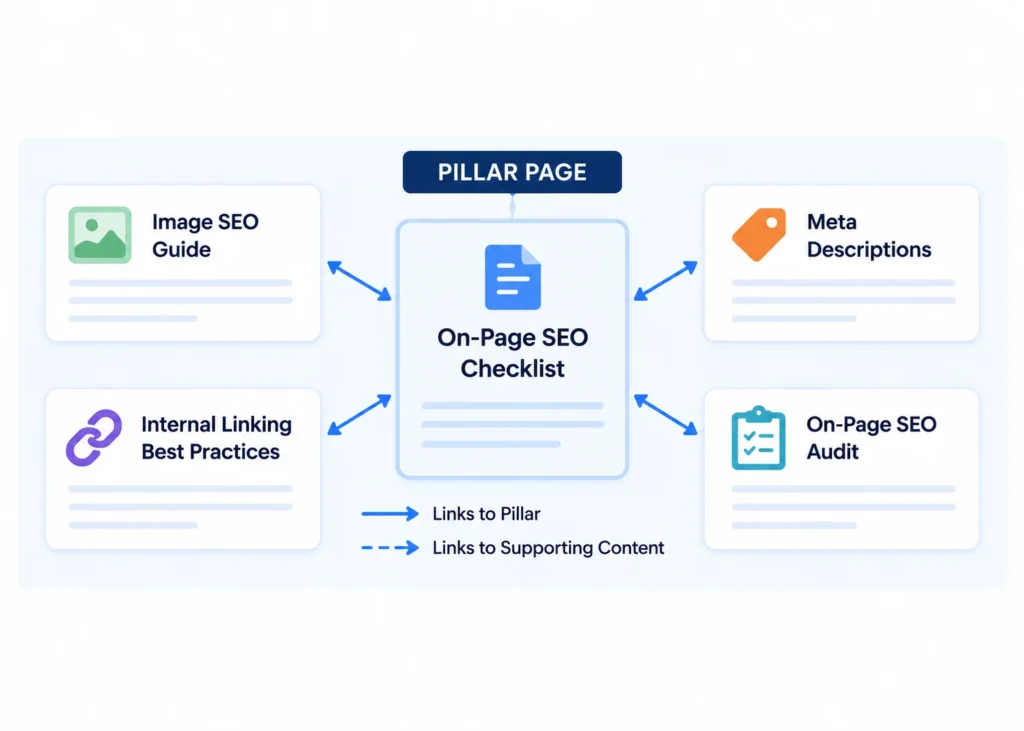
A topic cluster typically includes a broad pillar or central resource supported by narrower articles.
For example, a NextWebOps SEO cluster could contain:
- Pillar topic: On-Page SEO Checklist
- Supporting topic: Image SEO
- Supporting topic: Internal Linking Best Practices
- Supporting topic: On-Page SEO Audit
- Supporting topic: Meta Descriptions
The supporting articles can link to the pillar resource when relevant, while the pillar can direct readers to deeper guides for specific tasks.
The result is a useful network of related pages rather than isolated articles competing for attention.
7. Find and Fix Orphan Pages
An orphan page is a page with no meaningful internal links pointing to it from other pages on the website.
This often happens when businesses continually publish new content but never revisit older pages.
For example:
- A new article is written.
- The writer adds links from the new article to older content.
- The article is published.
- No existing page is updated to link back to the new article.
The new article technically exists, but its internal link support can be weak.
When publishing a new page, identify relevant older pages that could naturally link to it. This creates inbound internal links and integrates the new content into the existing site structure.
8. Update Internal Links in Older Content
Internal linking should not happen only while creating new articles.
Older content can contain some of your best internal linking opportunities because those pages already discuss topics related to newly published resources.
When reviewing older articles, look for:
- Mentions of topics you now cover in greater depth
- Generic references that could point to a useful guide
- Old internal destinations that have changed
- Broken links
- Pages that need stronger connections to a topic cluster
This fits naturally into a broader process for updating old blog posts for SEO.
For sites with large content libraries, reviewing old pages periodically can uncover internal linking opportunities that were impossible when the content was first published because the destination pages did not exist yet.
9. Do Not Force an Arbitrary Number of Internal Links
One of the most common questions is: How many internal links should a page have?
There is no universal number that works for every page.
A 700-word article with a narrow topic may need only a few contextual links. A 4,000-word comprehensive guide may reasonably contain many more.
Google itself states that there is no magical ideal number of links for a page.
The better questions are:
- Is each link relevant?
- Does it help the reader?
- Does the destination add useful information?
- Does the page feel overloaded with links?
- Are you repeatedly linking to the same destination without a reason?
For NextWebOps publishing, roughly three to five contextual internal links often provides a useful editorial starting point, but this should be adjusted according to the article rather than treated as a ranking formula.
10. Avoid Unnecessary Repeated Links to the Same Page
If you link to the same destination several times within a short section, additional links may provide little value.
One clear contextual link is often sufficient.
There are situations where linking to the same important destination more than once across a long article can make sense, especially when the reader could enter or skim the content at different points.
The principle is not “never repeat a URL.” It is to avoid repetitive linking that makes the page cluttered without helping users.
11. Link Directly to the Final URL
Internal links should ideally point directly to the current destination rather than relying on unnecessary redirect chains.
Suppose an old article contains this internal URL:
/old-seo-guide/
and that URL redirects to:
/on-page-seo-checklist/
The redirect may work, but when you discover the old internal link, update it to point directly to the final page.
This becomes particularly important after:
- Website migrations
- Redesigns
- Permalink changes
- Content consolidation
- HTTP-to-HTTPS migrations
- Category restructuring
Redirects have important uses, but your own internal links should generally reference the destination you actually want visitors and crawlers to reach.
12. Audit Internal Links Regularly
Internal linking changes as your website changes.
A good link today could become broken after a URL change. A page that was once important may be consolidated. A new article may need internal links from several older resources.
An internal link audit can look for:
- Broken internal links
- Links pointing through redirects
- Orphan pages
- Important pages with weak internal-link support
- Outdated anchor text
- Irrelevant links
- Pages that no longer fit the content structure
- New opportunities between related content
Internal links should also be reviewed during a wider website or SEO audit rather than assessed completely separately.
Internal Linking Example: Building a Topic Cluster
Consider a website that publishes a broad guide called:
On-Page SEO Checklist
The site also publishes more specific resources about:
- Image SEO
- Internal linking
- Meta descriptions
- On-page SEO audits
A weak structure would publish all of these articles without intentionally connecting them.
A stronger structure could work like this:
On-Page SEO Checklist → Image SEO
When the pillar page discusses images, it links to the detailed image optimization guide.
On-Page SEO Checklist → Internal Linking Best Practices
When it discusses internal links, it directs the reader to this more detailed guide.
Internal Linking Best Practices → On-Page SEO Checklist
This article links back to the broader SEO process where appropriate.
On-Page SEO Audit → Image SEO
The audit article links to the image guide when discussing image problems.
This structure creates useful pathways between related resources without inserting links simply because the pages share the word “SEO.”
Types of Internal Links
Not all internal links serve exactly the same purpose.
Contextual Links
These are links placed naturally inside page content. They usually point to resources that expand on something being discussed.
Navigation Links
These appear in menus and help users reach major areas of the website, such as services, categories, the blog, or contact information.
Breadcrumb Links
Breadcrumbs help show where a page sits within the broader hierarchy and provide convenient links back to higher-level sections.
Category and Archive Links
Blog categories, product collections, and other archive structures can connect individual pages to broader groups of related content.
Footer Links
Footers often contain links to important structural, company, contact, policy, or service pages. Avoid turning the footer into a large collection of keyword-stuffed SEO links.
Image Links
An image can also link internally. When an image functions as a link, its implementation and alternative text deserve particular attention because there may be no normal text anchor accompanying it.
How to Choose Anchor Text for Internal Links
The best anchor text tells the reader enough about the destination without turning the link into an awkward block of keywords.
| Destination | Weak Anchor | Better Anchor |
|---|---|---|
| SEO checklist | Click here | on-page SEO checklist |
| Image optimization guide | Read this | image SEO guide |
| SEO audit article | This page | on-page SEO audit |
| Content refresh guide | Learn more | update old blog posts for SEO |
Anchor text does not need to be identical every time a particular page is referenced.
Write the sentence first for the reader, then choose the most natural descriptive words as the link.
How Many Internal Links Should a Page Have?
There is no fixed number of internal links that every page should contain.
The right number depends on:
- Content length
- Topic complexity
- Number of genuinely relevant resources
- The purpose of the page
- Existing navigation and site structure
A practical guide may naturally link to several supporting articles. A simple landing page might need far fewer contextual links.
Do not add ten internal links because a checklist says you need ten. Conversely, do not remove useful links merely to stay below an arbitrary limit.
The reader should remain the primary test: does each link help them understand the subject or take a useful next step?
Common Internal Linking Mistakes
Using Generic Anchor Text Everywhere
Repeatedly using phrases such as “click here” removes useful context. Descriptive wording usually creates a clearer experience.
Linking to Irrelevant Pages
A link should make sense within the surrounding discussion. Do not link unrelated pages simply because you want to send more internal authority to them.
Overusing Exact-Match Keywords
The exact target keyword does not need to appear in every anchor pointing to a page. Write naturally and vary anchors where the context calls for it.
Leaving New Content Orphaned
After publishing a new page, identify relevant existing content that can link to it.
Ignoring Redirected Internal URLs
If an old internal URL redirects to a new destination, update your own links when practical so they point directly to the current URL.
Ignoring Broken Internal Links
Deleted pages, changed URLs, migration mistakes, and editing errors can create broken links. Check them periodically.
Linking Everything to the Homepage
The homepage already receives substantial structural attention on most websites. Deep internal links to specific relevant pages are often more useful to someone reading about a particular subject.
Treating Internal Linking as a One-Time Task
Your website changes whenever new content is published, URLs are updated, pages are removed, or topics are reorganized. Your internal linking structure should evolve with it.
Internal Linking Checklist
Use this checklist before publishing or updating a page:
- Does the page link to genuinely useful related content?
- Are internal links contextually relevant?
- Does each important link use descriptive anchor text?
- Does the anchor sound natural within the sentence?
- Are you unnecessarily repeating the same destination?
- Does the article support an existing topic cluster?
- Are important pages easy to reach?
- Have you checked for broken internal links?
- Do any internal links point through avoidable redirects?
- Have you identified older pages that should link to this new content?
- Have you tested the links on the published page?
Make Internal Linking Part of Publishing QA
A content draft may be well written and still be incomplete from a publishing perspective.
Before a page goes live, someone needs to verify:
- Heading structure
- Formatting
- Internal links
- Anchor text
- Metadata
- Images
- URLs
- Mobile presentation
- Final-page functionality
This is why internal linking works best when it is built into the publishing workflow rather than treated as an occasional SEO project.
A structured WordPress publishing checklist can help teams catch internal linking and other implementation issues before content goes live.
For businesses and agencies managing growing content libraries, maintaining all of these details can become time-consuming. NextWebOps provides hands-on content implementation and website publishing support, including internal linking, metadata, image optimization, content formatting, migrations, and publishing QA.
If your content is ready but your team needs reliable implementation across WordPress, Shopify, or Webflow, contact NextWebOps to discuss your publishing workflow.
Frequently Asked Questions About Internal Linking
What are internal links?
Internal links connect one page on a website to another page on the same domain. They can appear in page content, navigation menus, breadcrumbs, category pages, footers, and other website elements.
Does internal linking help SEO?
Internal linking can help search engines discover pages, understand relationships between content, and navigate your site. It can also improve the user experience by directing visitors to relevant resources.
How many internal links should a page have?
There is no universal ideal number. Use as many internal links as genuinely help readers navigate to relevant content without making the page cluttered or repetitive.
What is an example of an internal link?
If an article on NextWebOps about image optimization links to another NextWebOps article about on-page SEO, that link is internal because both pages are on the same website.
What anchor text should I use for internal links?
Use concise, descriptive wording that helps users understand the destination. For example, “internal linking checklist” is usually more informative than “click here.” Keep the wording natural rather than forcing exact-match keywords into every link.
What is an orphan page?
An orphan page is a page that has no meaningful internal links pointing to it from other pages on the website. When new content is published, adding relevant inbound internal links from existing pages can help integrate it into the site’s structure.
Should internal links open in a new tab?
Internal links generally do not need to open in a new tab. Allowing them to open normally usually creates a straightforward navigation experience. There may be specific interface situations where another behavior makes sense, but it should not be the default simply for SEO.
Do internal links need nofollow?
Normal editorial internal links generally do not need a nofollow attribute. If you want search engines to discover and understand your own related pages, standard crawlable links are usually the appropriate implementation.
Leave a Reply