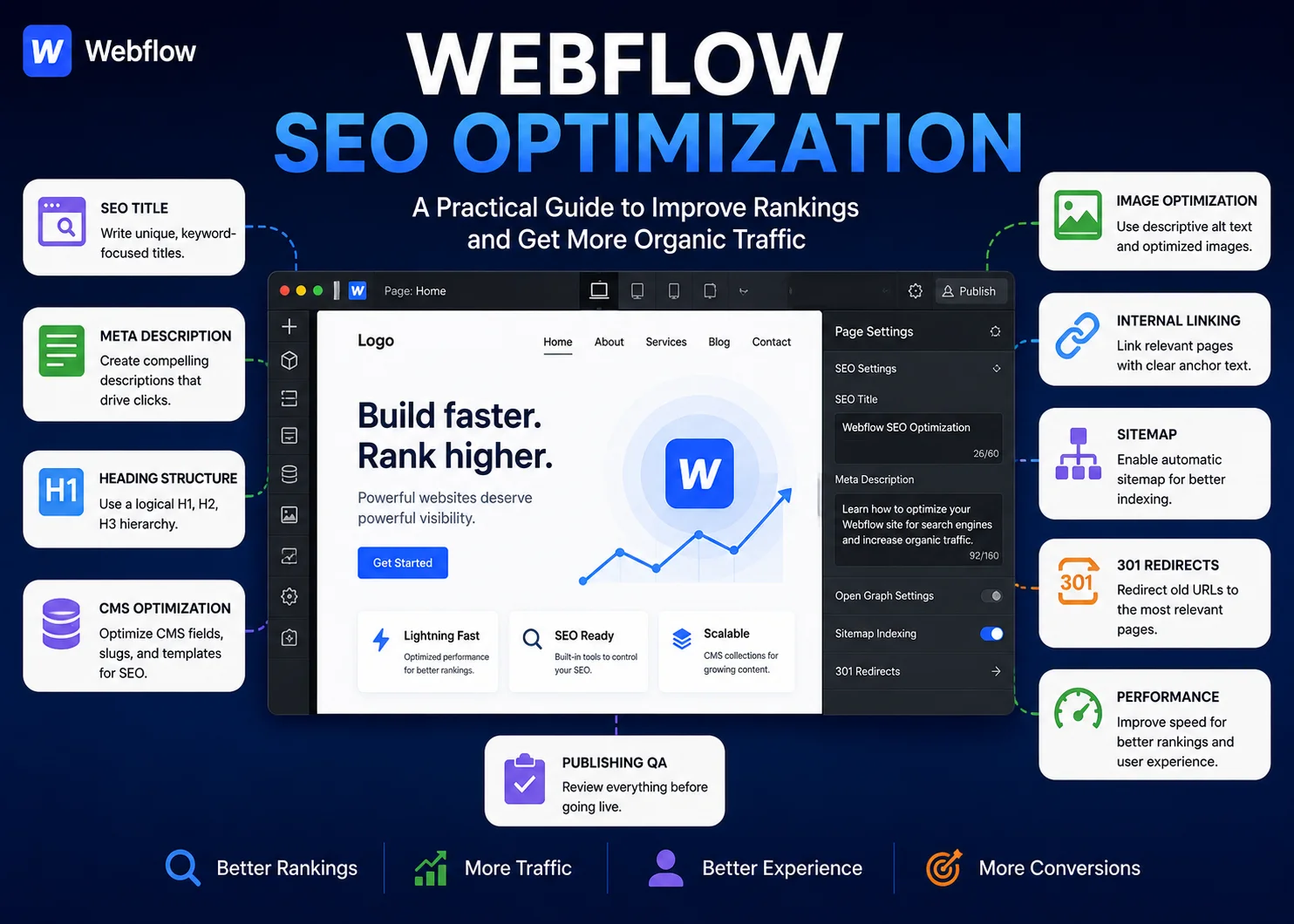
Webflow SEO optimization is the process of improving the content, structure, metadata, links, images, CMS settings, and technical elements of a Webflow website so search engines can better crawl, understand, and index its pages.
Webflow includes many useful SEO controls, but building a site in Webflow does not automatically mean every page is optimized.
You still need to make strategic decisions about search intent, page topics, titles, meta descriptions, headings, internal links, image optimization, CMS fields, redirects, and performance. Those decisions then need to be implemented correctly inside Webflow and checked on the live site.
A practical workflow looks like this:
Research → Optimize Content → Configure Webflow SEO → Improve Performance → QA → Publish → Monitor.
This guide explains how to work through that process on both static Webflow pages and CMS-driven content.
Is Webflow Good for SEO?
Yes, Webflow can be used effectively for SEO because it gives site owners control over many important optimization elements without requiring a traditional plugin-based SEO setup.
Depending on the page and site configuration, Webflow provides controls for areas such as:
- SEO titles
- Meta descriptions
- URLs and slugs
- Image alt text
- 301 redirects
- Sitemaps
- Open Graph settings
- Custom code
- Structured data implementation
- Responsive layouts
Webflow also gives designers and content teams substantial control over page structure and CMS templates.
However, the platform cannot decide which keyword a page should target, whether two pages compete for the same intent, how much content a service page needs, or which internal links are most useful.
Webflow provides the controls. SEO strategy and implementation determine how well those controls are used.
What Is Webflow SEO Optimization?
Webflow SEO optimization means improving a Webflow site’s pages and settings so they are easier for search engines to understand and more useful for visitors.
That normally includes a combination of:
- Search intent
- Content quality
- Keyword targeting
- SEO titles and meta descriptions
- Heading hierarchy
- Internal links
- Image optimization
- URLs
- CMS configuration
- Redirects
- Page performance
- Indexing and sitemap settings
- Publishing QA
It is one platform-specific form of broader web page optimization, where individual pages are improved across search visibility, usefulness, performance, and conversion goals.
12 Webflow SEO Optimization Steps
The following workflow covers the most important areas to review when optimizing a Webflow site.
1. Match Every Important Page to Search Intent
Start with the purpose of the page.
Ask what someone searching for the target topic actually wants.
Common intent patterns include:
- Service pages: Commercial intent
- Blog posts: Informational intent
- Case studies: Proof and commercial evaluation
- Landing pages: Conversion-focused intent
- Resource pages: Informational or educational intent
A page can have excellent metadata and still underperform if it answers the wrong question.
For example, a user searching for “Webflow content migration services” is likely looking for a provider or service information. A long beginner tutorial on exporting CMS items would not satisfy that intent well.
Review the current search results for important keywords and compare the types of pages ranking.
2. Choose a Clear Primary Keyword and Topic
Each important page should have a distinct primary purpose.
The page can naturally include many related terms, but those terms should support one main topic rather than create several unrelated directions.
For example, a Webflow service page might target one specific service while related blog articles address supporting informational questions.
This also helps reduce keyword cannibalization, where multiple pages from the same site compete for essentially the same search intent.
When reviewing existing content at scale, a structured content optimization strategy can help identify which pages deserve updates first.
3. Optimize Webflow SEO Titles
The SEO title is one of the strongest page-level signals you can directly control.
A useful SEO title should:
- Clearly describe the page
- Reflect the primary search intent
- Use the main topic naturally
- Be unique for important pages
- Avoid unnecessary keyword repetition
It is usually helpful to keep titles concise enough that the most important message appears clearly in search results.
Compare:
Weak: Services | Company Name
Better: Webflow Content Publishing Services | Company Name
The second version provides more useful context.
For a broader review of page-level optimization elements, use the NextWebOps on-page SEO checklist.
4. Write Useful Meta Descriptions
A meta description summarizes the page and may appear beneath the title in search results.
Strong descriptions should:
- Accurately reflect the page
- Match search intent
- Include the main topic naturally
- Highlight useful value
- Remain concise
Do not write the same generic description across dozens of pages.
For example:
Generic: Learn more about our company and the great services we provide.
Specific: Get Webflow content publishing support for CMS updates, formatting, metadata, internal links, image optimization, and publishing QA.
Search engines can generate different snippets for individual queries, so the entered description is not guaranteed to display word for word.
5. Use a Logical H1, H2, and H3 Structure
Heading hierarchy helps visitors scan a page and helps communicate content structure.
A typical page might use:
- H1 for the primary page title
- H2 for major sections
- H3 for subsections within those sections
One common Webflow issue occurs when headings are selected primarily for their visual appearance rather than their semantic purpose.
A designer might choose an H4 because it matches a preferred font size even though the content should logically be an H2.
Style headings using classes and design settings, but keep the actual heading hierarchy logical.
Also review reusable components carefully. If a component adds an unnecessary H1 to every page where it appears, one design decision can affect many URLs.
6. Optimize Webflow CMS Content
Webflow CMS is especially useful for sites publishing repeatable content types such as:
- Blog posts
- Case studies
- Resources
- Team profiles
- Projects
- Location pages
- Industry pages
CMS pages need a scalable SEO structure.
Important areas include:
- Dynamic SEO titles
- Dynamic meta descriptions
- CMS slugs
- Heading structure
- Unique body content
- Images and alt text
- Internal links
For example, a case study collection might contain fields for:
- Client or project name
- Industry
- Primary result
- SEO title
- Meta description
- Featured image
- Image alt text
Those fields can then connect to the CMS template.
The benefit is scalability. The risk is also scalability.
If one dynamic title formula is poorly designed, the mistake can affect every item in the collection.
This is why CMS implementation should always include template-level QA followed by checks on individual published items.
Have SEO recommendations ready but need metadata, CMS content, images, links, and page updates implemented correctly? Contact NextWebOps for Webflow content publishing and SEO implementation support.
7. Optimize Images and Alt Text
Webflow sites often rely heavily on visual design, which makes image optimization especially important.
Review:
- Image dimensions
- File size
- Compression
- File format
- Filename
- Alt text
- Whether the image is decorative or informative
A common mistake is uploading a very large image and simply displaying it at a smaller visual size.
Resize images appropriately before uploading when possible, and use efficient formats such as WebP or AVIF when suitable for the asset and workflow.
Alt text should accurately describe informative images rather than act as a field for keyword stuffing.
Decorative images may not require the same descriptive treatment as images that communicate useful information.
For more detail, see these image SEO best practices.
8. Improve Internal Linking
Internal links help search engines and users understand relationships across your website.
Useful Webflow internal-linking patterns include:
- Blog article → relevant service
- Resource → supporting guide
- Service page → relevant case study
- Case study → related service
- Article → related CMS article
Use descriptive anchor text that tells readers what they will find at the destination.
For example:
Weak anchor: Click here
Better anchor: internal linking best practices
Also look for orphan pages: URLs that exist but receive few or no useful internal links.
For a deeper framework, see the NextWebOps guide to internal linking best practices.
9. Review URLs and Slugs
Webflow gives you control over page slugs and CMS item URLs within the site’s structure.
Good slugs are usually:
- Readable
- Concise
- Descriptive
- Relevant to the page topic
For example:
/webflow-content-publishing/
is clearer than:
/service-page-final-v2-new/
Be cautious about changing URLs on established pages.
If the existing page already receives traffic, backlinks, or internal links, changing the slug without proper redirect handling can create unnecessary SEO problems.
10. Configure 301 Redirects Correctly
Webflow includes redirect functionality that becomes important whenever URLs change.
Common situations include:
- Changing a page slug
- Removing outdated content
- Consolidating two pages
- Restructuring the website
- Migrating content from another CMS
A 301 redirect sends visitors and search engines from an old URL to the most relevant replacement.
For example:
/old-webflow-service/
might redirect to:
/webflow-content-publishing/
Do not automatically redirect every deleted page to the homepage. The destination should be relevant to the old page.
Also try to avoid unnecessary redirect chains such as:
Page A → Page B → Page C
When practical, Page A should redirect directly to the final destination.
11. Improve Page Performance and Mobile Experience
Visual flexibility is one of Webflow’s strengths, but it can also make it easy to create heavy pages if performance is ignored.
Common issues include:
- Oversized images
- Large background videos
- Too many interactions or animations
- Heavy third-party scripts
- Unused elements
- Complex page structures
- Mobile layouts that were not fully tested
Review pages on real mobile breakpoints, not only desktop.
Check whether:
- Text is readable
- Buttons are usable
- Images resize properly
- Horizontal overflow appears
- Navigation works correctly
- Interactive elements remain understandable
Performance should be treated as part of the user experience rather than a score-chasing exercise.
12. Perform SEO and Publishing QA
This is the step that turns optimization recommendations into correctly published work.
Before publishing an important Webflow page, review:
- SEO title
- Meta description
- Page slug
- H1, H2, and H3 structure
- Page content
- Internal links
- External links
- Images
- Alt text
- Buttons and CTAs
- CMS field connections
- Responsive layout
- Redirects
- Indexing settings where applicable
- Schema implementation where applicable
Then check the published version rather than relying only on the Designer or CMS editor.
A correct SEO brief can still turn into a weak page if the wrong heading tag is used, a dynamic meta field is not connected, an image remains oversized, or a redirect is missed.
Publishing SEO updates across dozens of Webflow pages or CMS items can become time-consuming. Talk to NextWebOps about Webflow content updates, metadata, image optimization, internal links, redirects, formatting, and QA.
Important Webflow SEO Settings to Review
Beyond visible page content, Webflow includes several SEO-related settings worth reviewing.
Page-Level SEO Settings
Important static pages should have intentional:
- SEO titles
- Meta descriptions
- Open Graph titles
- Open Graph descriptions
- Social-sharing images
The Open Graph settings do not directly replace search metadata. They control how pages may appear when shared on supported social platforms.
Sitemap Settings
Webflow supports sitemap generation, which can help search engines discover your site’s indexable URLs.
Review the sitemap setup after significant publishing changes, migrations, or site restructuring.
A sitemap helps discovery, but inclusion in a sitemap does not guarantee indexing or rankings.
Indexing Controls
Not every page necessarily needs to appear in search results.
Examples might include certain internal utility pages, campaign variants, or other pages intentionally excluded from search.
However, do not apply noindex settings casually to important content.
Always confirm the purpose of the page before changing indexing controls.
301 Redirects
Redirect settings should be reviewed during:
- Site migrations
- URL restructuring
- Content consolidation
- Page removal
Keep a redirect map when working on larger migrations or content cleanup projects so changes can be QA-checked systematically.
Schema and Custom Code
Structured data can provide search engines with additional context about certain types of content.
Depending on the page, appropriate schema might apply to:
- Articles
- Organizations
- Breadcrumbs
- Products
- Other supported content types
Schema should accurately reflect what the page actually contains. Adding irrelevant structured data simply because a markup type exists does not make a page more useful.
Webflow Audit Tools
Webflow provides site auditing and SEO-related tools that can help identify certain implementation issues.
These can be useful for detecting problems such as missing fields or structural issues, but an automated audit cannot fully judge search intent, content quality, or whether an internal link genuinely helps the reader.
Webflow SEO for Static Pages vs CMS Pages
Static and CMS-driven pages require slightly different optimization workflows.
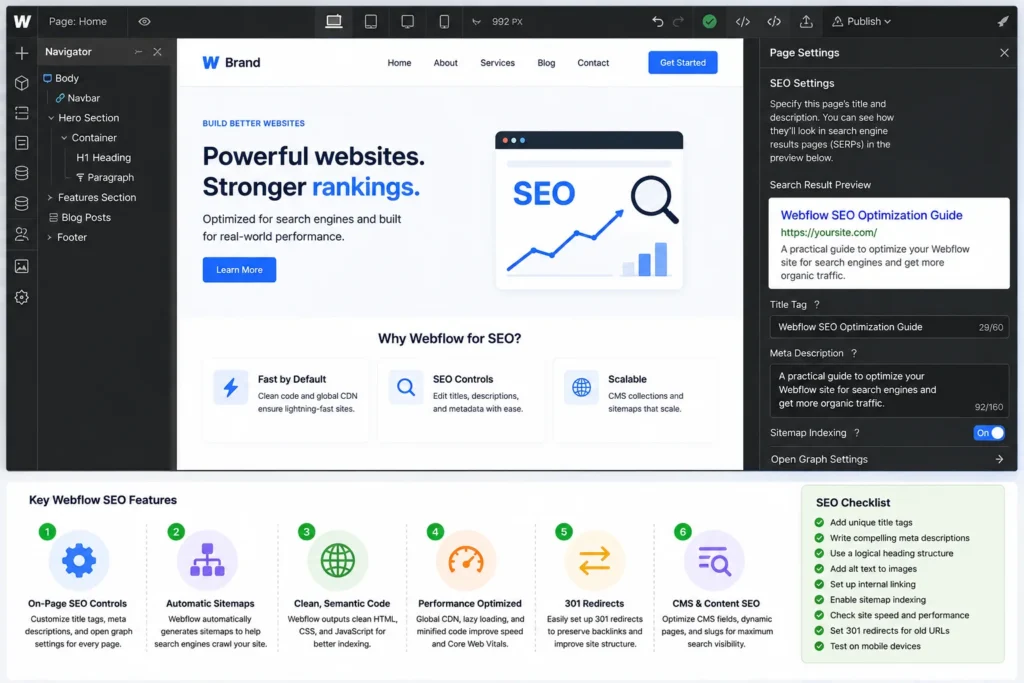
| SEO Area | Static Pages | CMS Pages |
|---|---|---|
| SEO title | Configured individually | Can use dynamic CMS fields |
| Meta description | Written individually | Can be mapped dynamically |
| URL | Manual page slug | CMS item slug |
| Content | Edited directly on page | Driven by CMS fields/template |
| QA risk | Usually affects one URL | Template errors can affect many URLs |
Static Page SEO
Static pages commonly include:
- Homepage
- About page
- Service pages
- Contact page
- Landing pages
Each can normally receive a custom SEO title, description, heading structure, content layout, and internal-link setup.
This provides flexibility, but it also means every page needs individual attention.
CMS Page SEO
CMS-driven pages typically include repeatable content types such as:
- Blog posts
- Case studies
- Resources
- Projects
- Team profiles
Here the objective is to build a strong template and feed it high-quality CMS data.
For example, a dynamic SEO title could pull from:
- Article title
- Category
- Brand name
But dynamic fields must be reviewed carefully.
A missing CMS value can create incomplete metadata, and a poorly structured template can produce repetitive SEO titles across hundreds of pages.
This is why Webflow CMS SEO requires both scalable structure and individual quality checks.
Common Webflow SEO Mistakes
Missing or Duplicate SEO Titles
Important pages should have clear titles that match their purpose rather than generic or repeated metadata.
Generic Meta Descriptions
A description should summarize the actual page rather than repeat the same company slogan everywhere.
Using Heading Tags for Styling
Choose headings based on document structure, then style them visually using Webflow classes.
Oversized Images
Large image files can add unnecessary page weight across visually rich sites.
Missing Alt Text
Informative images should have appropriate text alternatives where useful.
Weak CMS SEO Fields
If a CMS collection lacks the fields needed for titles, descriptions, images, or other optimization elements, scaling consistent SEO becomes harder.
Thin CMS Collection Items
Creating hundreds of pages from a CMS does not make those pages useful automatically.
Each indexable page should have a legitimate purpose and enough unique value to justify its existence.
Poor Internal Linking
Publishing blog posts without connecting them to relevant services, resources, or related articles can leave valuable pages isolated.
Changing URLs Without Redirects
Always consider existing traffic and links before changing established slugs.
Overusing Animations and Scripts
Visual effects should support the experience rather than unnecessarily increase page complexity.
Ignoring Mobile Layouts
A page that looks excellent on a large desktop screen can still contain broken spacing, unreadable text, or awkward interactions on mobile.
Assuming Webflow Automatically Does SEO
Webflow provides useful SEO functionality, but the platform does not replace research, content strategy, optimization, or QA.
Webflow SEO Optimization Checklist
Use this checklist before publishing or updating an important Webflow page:
- Search intent confirmed
- Primary page topic identified
- SEO title optimized
- Meta description written
- H1, H2, and H3 hierarchy checked
- Content is useful and unique
- CMS SEO fields configured where applicable
- URL or CMS slug reviewed
- Images resized and compressed
- Alt text reviewed
- Internal links added
- External links checked
- Redirects configured when URLs changed
- Mobile layout reviewed
- Performance issues checked
- Sitemap and indexing setup reviewed
- Schema checked where relevant
- Live-page publishing QA completed
Do You Need Webflow SEO Tools or Plugins?
Webflow does not depend on SEO plugins in the same way some other content management systems do.
Many fundamental controls are available directly through the platform.
Third-party SEO tools can still help with tasks such as:
- Keyword research
- Competitor analysis
- Site crawling
- Rank tracking
- Performance testing
- Content analysis
- Backlink research
But these tools generally identify opportunities or problems. Someone still needs to make the appropriate changes inside Webflow.
For example, a crawler may tell you that 50 pages have missing meta descriptions. The actual work is determining which descriptions are needed, writing them, adding them to the right static or CMS fields, publishing the changes, and checking the results.
When to Get Help With Webflow SEO Implementation
A small Webflow website with a handful of static pages may be manageable for an internal marketing team.
The workload becomes more substantial when:
- Large CMS collections need updates
- Dozens of pages need new metadata
- Images need optimization
- Internal links must be implemented across existing content
- Redirect maps need to be published
- SEO briefs are complete but implementation is backlogged
- Content formatting is inconsistent
- CMS fields need cleanup or population
- Publishing QA is slowing launches
SEO strategy and publishing implementation do not always need to be handled by the same team.
An SEO strategist can determine what should change, while a Webflow implementation team handles content entry, metadata, links, images, formatting, redirects, and final QA.
Final Thoughts
Effective Webflow SEO optimization requires more than turning on a few settings.
Webflow provides strong tools for managing important SEO elements, but search performance still depends on how those tools are used.
A complete workflow should combine:
Search intent + content + metadata + headings + CMS structure + images + internal links + URLs + redirects + performance + publishing QA.
For small sites, these updates may be manageable page by page.
For larger Webflow sites, especially those built around CMS collections, scalable field structures and careful template QA become increasingly important.
The goal is not simply to make every SEO field complete. It is to make every important page useful, clearly structured, correctly implemented, and easy for both users and search engines to understand.
Need help turning your Webflow SEO plan into correctly published site updates? Get in touch with NextWebOps for Webflow content publishing, SEO implementation, image optimization, internal linking, metadata, redirects, and QA support.
Frequently Asked Questions
Is Webflow good for SEO?
Yes. Webflow provides built-in controls for important SEO elements such as titles, meta descriptions, URLs, image alt text, redirects, sitemaps, and responsive design. SEO performance still depends on the quality of the strategy, content, implementation, and site structure.
Can Webflow rank well on Google?
A Webflow website can rank in Google when its pages satisfy relevant search intent and are supported by strong content, on-page SEO, internal linking, technical accessibility, performance, and other ranking factors. Using Webflow itself does not prevent a site from competing in organic search.
How do I optimize SEO in Webflow?
Start by defining search intent and the primary topic for each page. Then optimize the SEO title, meta description, headings, content, images, internal links, URLs, CMS fields, redirects, performance, mobile presentation, and publishing settings.
Does Webflow have built-in SEO tools?
Yes. Webflow includes controls for several important SEO functions, including page metadata, redirects, sitemap functionality, image alt text, and other site settings. External tools can still help with research, crawling, monitoring, and performance analysis.
How do I edit SEO titles and meta descriptions in Webflow?
SEO titles and meta descriptions can be configured through Webflow’s page settings. CMS templates can also use dynamic fields so metadata is generated from collection-item data. Important dynamic outputs should be checked to ensure they remain specific and complete.
Does Webflow automatically create a sitemap?
Webflow supports automatic sitemap generation when configured appropriately. Review the sitemap after significant content changes, migrations, or restructuring to confirm important indexable pages are represented correctly.
How do 301 redirects work in Webflow?
301 redirects send visitors and search engines from an old URL to a new relevant destination. They are particularly important when page slugs change, content is consolidated, pages are removed, or a website is migrated.
How do I optimize Webflow CMS pages for SEO?
Configure useful CMS fields for titles, meta descriptions, slugs, page content, images, and other required SEO data. Connect those fields correctly to the CMS template, maintain unique content, add relevant internal links, and QA multiple published collection items to make sure the template works consistently.
Leave a Reply