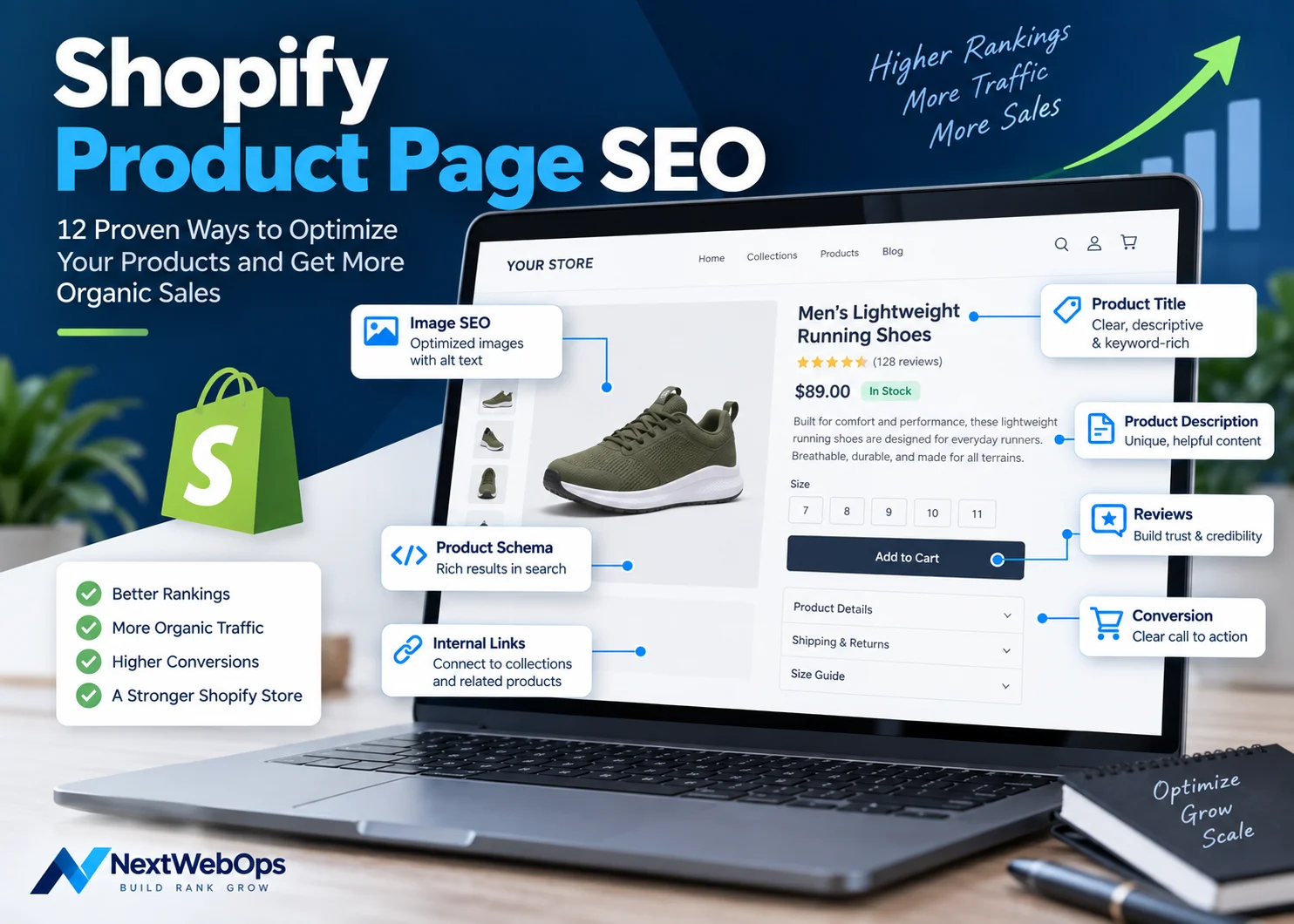
Shopify product page SEO is the process of optimizing individual product pages so search engines can understand what you sell and shoppers can quickly decide whether the product meets their needs.
A product page can have great photography and a polished design yet still underperform in organic search if the title is vague, the description is copied from a supplier, the images are oversized, the metadata is generic, or the page has few internal links.
The strongest product pages combine SEO with ecommerce usability. They target the right search intent, explain the product clearly, load efficiently, provide useful images and specifications, and make purchasing straightforward.
This guide walks through 12 practical ways to optimize Shopify product pages, from keyword targeting and descriptions to images, structured data, internal links, mobile usability, and final publishing QA.
What Is Shopify Product Page SEO?
Shopify product page SEO focuses on improving an individual product URL for relevant searches.
A Shopify store usually contains different page types with different SEO jobs:
- Homepage: represents the broader brand and business.
- Collection pages: target broader categories where shoppers want to compare products.
- Product pages: target searches for a specific product, model, material, feature combination, or use case.
- Blog posts: answer informational questions earlier in the customer journey.
For example, someone searching for women’s running shoes will often benefit from a collection containing multiple options. Someone searching for a particular shoe model may be better served by the individual product page.
Shopify’s official ecommerce product page SEO guide similarly emphasizes product titles, descriptions, images, internal linking, page speed, structured data, mobile usability, reviews, and conversion elements.
The goal is not simply to insert keywords. It is to make the page clearly relevant to the right search while giving the shopper enough information to make a confident decision.
How to Optimize Shopify Product Pages for SEO
1. Choose the Right Product-Level Keyword
Start with search intent.
A product page should generally target a query specific enough that someone searching it would reasonably want to land on one product rather than browse an entire category.
For example, imagine you sell a waterproof women’s trail running shoe.
A suitable product-level keyword might relate to:
- the specific product name
- the model
- brand + model searches
- a distinctive material or feature
- a specific use case
Trying to make one product page rank for an extremely broad term such as women’s shoes is usually a poor fit. A collection page is generally better suited to that broader search.
Shopify’s current SEO guidance recommends matching page type to search intent: specific product searches can fit product pages, while broader category searches are often better suited to collections.
This page-type distinction should be part of your wider Shopify homepage SEO and site keyword strategy rather than deciding keywords one product at a time.
2. Write a Clear, Descriptive Product Title
The product title should tell customers what the item is without making them decode an internal model number or marketing name.
For example:
Weak: XR200
More descriptive: XR200 Women’s Waterproof Trail Running Shoes
The second version provides context while preserving the model name.
That does not mean every product title needs to contain every possible attribute. Include details that genuinely help identify the product.
A title overloaded with repeated keywords can become difficult to scan:
Poor: Women’s Waterproof Trail Running Shoes Lightweight Women’s Trail Shoes Waterproof Running Shoes
Use natural language. The product title should first make sense to the person considering buying it.
3. Write Unique, Helpful Product Descriptions
Product descriptions are one of the biggest opportunities for Shopify stores to improve both SEO and customer experience.
Avoid copying manufacturer or supplier descriptions across your catalog whenever you can provide better original information.
A useful description should explain:
- what the product is
- who it is designed for
- what problem it solves
- important features
- materials
- dimensions or specifications
- fit or sizing where relevant
- care or usage information
For example, instead of:
Premium trail shoe made with high-quality materials.
you could provide:
Designed for wet and uneven trails, the XR200 combines a waterproof upper with a high-grip outsole and cushioned midsole. Its lightweight construction makes it suitable for everyday trail running while the reinforced toe provides additional protection on rocky terrain.
The second description helps search engines understand the product because it also helps the customer understand the product.
For longer descriptions, use short paragraphs, bullet points, and useful sections rather than publishing one large block of text.
If your team already has product copy but needs consistent implementation across Shopify, get help with Shopify product page implementation.
4. Optimize the SEO Title and Meta Description
Shopify lets you edit the search engine listing for a product independently from some of the visible page content.
Your SEO title should accurately summarize the product and include the main search topic when it reads naturally.
Example:
SEO Title: Women’s Waterproof Trail Running Shoes | Brand
A useful meta description could be:
Shop lightweight women’s waterproof trail running shoes designed for grip, comfort, and stability across wet and technical terrain.
The description should encourage a relevant shopper to click rather than simply repeat keywords.
Avoid using the same generic meta description across hundreds of products. Important product pages should have metadata that reflects the actual item.
If you are optimizing multiple Shopify templates, this broader Shopify on-page SEO guide provides a workflow covering titles, descriptions, URLs, images, internal links, and other page-level elements.
5. Keep the Product URL Clean
A clean Shopify product handle is easier to understand than an internal product code or automatically generated phrase.
For example:
/products/womens-waterproof-trail-running-shoes
is clearer than:
/products/item-4729-new-final-product
Do not add unnecessary words just to make the URL longer or repeat the target keyword.
Also avoid changing established URLs solely for cosmetic SEO reasons. If an existing product page already has traffic, backlinks, rankings, or internal links, changing the handle creates additional work and potential risk.
When a URL genuinely needs to change, make sure the old URL redirects appropriately.
6. Optimize Product Images
Product images influence both customer confidence and page performance.
Before uploading images to Shopify:
- resize them for realistic website use
- compress unnecessary file size
- use an efficient format such as WebP where appropriate
- rename generic files descriptively
- write accurate alt text for meaningful images
- check mobile display
- keep product imagery consistent across the catalog
Instead of:
IMG_8241.jpg
use something more descriptive, such as:
xr200-womens-waterproof-trail-shoe-side.webp
If another image shows the sole, its filename and alt text should describe that different view rather than duplicating the first image’s text.
Google’s image SEO best practices recommend useful image context, descriptive information, and accessible image implementation. Google also advises against keyword-stuffed alternative text.
For a full implementation workflow, see the NextWebOps guide to image SEO.
7. Build Internal Links Around Product Pages
Product pages should not exist as isolated URLs that can only be reached through site search.
Relevant internal links can point to a product page from:
- its parent collection
- related collections
- buying guides
- blog posts
- comparison articles
- homepage features where appropriate
The product page can also link out to useful pages such as:
- the parent collection
- related products
- sizing guides
- care instructions
- shipping information
- relevant educational content
For example, an article explaining how to choose trail running shoes can link naturally to a relevant product once the reader understands which characteristics to look for.
This is why your Shopify blog SEO strategy should work together with product SEO instead of treating blog traffic as a separate channel.
Likewise, broader category searches should usually be supported by properly optimized Shopify collection pages, which can then distribute users and internal-link equity toward individual products.
8. Verify Product Structured Data
Structured data can help search engines understand important ecommerce information in a machine-readable format.
Google’s official Product structured data documentation explains that eligible product information can include details such as price, availability, ratings, shipping information, and other merchant data.
Before adding another schema app, inspect what your Shopify theme already outputs.
Many themes include product-related structured data, and installing multiple tools that generate overlapping markup can create unnecessary duplication or conflicts.
Check:
- product name
- price
- availability
- currency
- review information where eligible
- variant information where applicable
Use Google’s Rich Results Test and Search Console to investigate structured-data errors rather than assuming the implementation is correct because JSON-LD exists in the source code.
9. Add Reviews and Useful Trust Information
Product pages need to answer questions that affect buying confidence.
Depending on the product, useful trust information may include:
- customer reviews
- ratings
- availability
- shipping information
- returns information
- warranty details
- materials
- dimensions
- size guidance
Do not treat reviews as an excuse to manufacture user-generated content or make unsupported SEO claims.
Genuine reviews can help potential customers evaluate products, and eligible review data may also form part of structured product information.
Shopify’s current product-page guidance also emphasizes reviews, product imagery, descriptions, clear calls to action, and mobile usability as important parts of an effective ecommerce page.
10. Improve Mobile UX and Page Speed
Many ecommerce visitors will view product pages on phones, so desktop-only optimization is not enough.
Check the page on a real mobile-sized viewport.
Review:
- product gallery behavior
- variant selectors
- price visibility
- Add to Cart button placement
- description readability
- review widgets
- sticky bars
- popups
- image loading
Third-party Shopify apps can also add scripts, widgets, trackers, and functionality that increase page complexity. Remove apps and page elements that no longer provide enough value to justify their performance cost.
Large product images are another common source of unnecessary page weight, which is why image optimization should happen before publishing rather than after performance problems appear.
11. Avoid Duplicate and Thin Product Content
Duplicate product content can appear when stores reuse supplier descriptions across many websites or publish nearly identical copy across several variants.
Where products genuinely differ, explain those differences.
Useful distinctions might include:
- materials
- dimensions
- compatibility
- fit
- intended use
- features
- included accessories
Do not create artificial differences solely to make every page look unique.
Variant handling also requires care. Color, size, bundle, and other configurations can be implemented differently depending on the Shopify theme and apps being used.
Review the actual URLs, canonical tags, and indexability of your store instead of assuming every Shopify setup handles variants identically.
12. Complete a Final Shopify Product Page SEO QA Check
A product page is not finished when all the fields inside Shopify have been populated.
Review the live page after publishing.
Check:
- product title
- primary keyword alignment
- unique product description
- SEO title
- meta description
- URL
- image quality
- image filenames
- alt text
- internal links
- price and availability
- variants
- structured data
- reviews
- Add to Cart functionality
- mobile layout
- broken links
- indexability
Then test the actual purchasing experience.
Can customers select the correct variant? Can they understand what they are buying? Is the price clear? Does the Add to Cart button work? Are important product details visible without unnecessary friction?
This final QA stage is particularly important when managing dozens or hundreds of product pages because small implementation mistakes can be repeated across an entire catalog.
If you need help checking product descriptions, images, links, metadata, formatting, and live storefront presentation, discuss your Shopify publishing workflow with NextWebOps.
Shopify Product Page SEO Example
Consider a store selling a product called the XR200 Women’s Waterproof Trail Running Shoe.
A practical SEO setup might look like this:
- Primary topic: women’s waterproof trail running shoes
- Product title: XR200 Women’s Waterproof Trail Running Shoes
- URL:
/products/xr200-womens-waterproof-trail-running-shoes - Opening copy: Explain that the shoe is designed for wet and technical trails and summarize its primary benefits.
- Features: Waterproof upper, high-grip outsole, cushioned midsole, reinforced toe.
- Additional information: Fit, sizing, materials, weight, intended terrain, and care information.
- Image filename:
xr200-womens-waterproof-trail-shoe.webp - Alt text: Women’s XR200 waterproof trail running shoe in blue and black.
- SEO title: XR200 Women’s Waterproof Trail Running Shoes
- Meta description: Shop XR200 women’s waterproof trail running shoes built for grip, comfort, and stability across wet and technical trails.
- Internal links: Women’s trail running shoes collection, trail running guide, sizing guide.
- Structured data: Verify price, availability, product information, and eligible review data.
Notice that the keyword is not repeated in every field mechanically.
Each element has its own purpose while reinforcing a consistent understanding of what the product is.
Shopify Product Page SEO Template
Use this framework when preparing new Shopify products.
Product Title
[Product/Model Name] + [Useful Product Type or Differentiator]
Opening Product Description
Explain what the product is, who it is designed for, and its primary benefit in a short opening paragraph.
Key Features
- Feature and customer benefit
- Feature and customer benefit
- Feature and customer benefit
Specifications
- Materials
- Dimensions
- Weight
- Compatibility
- Included items
Additional Helpful Information
Depending on the product, add sizing, care instructions, installation guidance, warranty information, or answers to common buying questions.
SEO Fields
- Primary keyword or keyword theme
- SEO title
- Meta description
- Product handle
- Image filenames
- Alt text
- Internal links
This structure does not need to be identical on every product. Adapt it to what customers genuinely need to know.
Shopify Product Page SEO Checklist
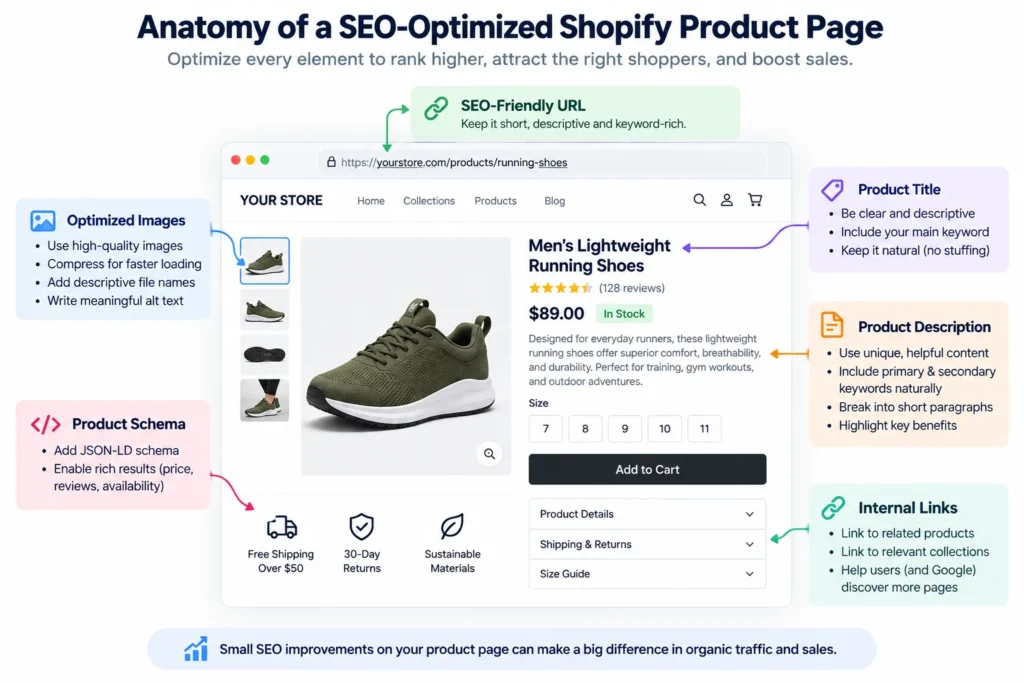
- Choose an appropriate product-level keyword.
- Confirm the search intent suits a product page.
- Use a clear and descriptive product title.
- Write original, useful product content.
- Add unique SEO metadata.
- Use a clean product handle.
- Optimize product images.
- Add contextual internal links.
- Verify Product structured data.
- Add useful reviews and trust information.
- Test the page on mobile.
- Complete live-page publishing QA.
Product Page vs Collection Page SEO
Choosing the correct page type is one of the most important ecommerce SEO decisions.
A product page works best when the search is specific.
For example:
Search: XR200 waterproof trail shoe
A specific product page can be a strong match.
A collection page is generally better when the searcher wants choices.
For example:
Search: women’s trail running shoes
A page showing several relevant shoes gives that customer more useful options.
Trying to make one product page rank for every broad category query can create poor search-intent alignment and internal competition.
Use your Shopify collection page SEO strategy for broader commercial categories and reserve product pages for more specific product-level intent.
Common Shopify Product Page SEO Mistakes
Many product-page issues are not advanced technical SEO problems. They are repeated publishing problems.
- Copying supplier descriptions: Generic copy rarely gives your store a strong, distinctive product explanation.
- Using unclear product titles: Internal model names alone may not tell shoppers what the item is.
- Duplicating metadata: Reusing one title or description across a catalog reduces page specificity.
- Uploading oversized images: Huge source files add unnecessary page weight.
- Using generic filenames: Names such as
IMG_4721.jpgprovide little descriptive context. - Forgetting internal links: Products should connect to relevant collections and supporting content.
- Installing unnecessary schema apps: Check existing theme output before adding overlapping markup.
- Targeting broad category terms: Not every keyword belongs on a product page.
- Ignoring mobile usability: A desktop-friendly product page may still be frustrating on a phone.
- Skipping final QA: Always inspect the live storefront after publishing.
Final Thoughts on Shopify Product Page SEO
Strong Shopify product page SEO comes from aligning the page with the right search intent and then implementing every important detail consistently.
The product title, description, metadata, images, links, structured data, reviews, page speed, mobile layout, and purchasing experience should all work together.
For a small store, these tasks may be manageable product by product. For catalogs containing hundreds or thousands of items, consistent implementation becomes a content operations challenge as much as an SEO challenge.
NextWebOps helps businesses and agencies with Shopify product publishing, content formatting, metadata, image optimization, internal linking, on-page SEO implementation, and publishing QA.
Contact NextWebOps about your Shopify catalog.
Frequently Asked Questions
How do I improve SEO on a Shopify product page?
Start by matching the page to an appropriate product-level search intent. Then optimize the product title, original description, SEO title, meta description, URL, images, internal links, structured data, mobile presentation, and live-page implementation.
What should I put in a Shopify product description for SEO?
Describe what the product is, who it is for, its primary benefits, important features, specifications, materials, sizing, use cases, and other information customers need to make a decision. Use relevant terminology naturally rather than repeating a target keyword.
Should every Shopify product page target a different keyword?
Each product should have a distinct purpose, but keyword overlap is natural when products are similar. Focus on accurately representing each product rather than forcing an artificial unique keyword onto every SKU. Broader category keywords may be better targeted with collection pages.
How long should Shopify product descriptions be?
There is no universal ideal length. The description should be long enough to answer important buying questions without adding filler. A simple product may need relatively little copy, while a technical or expensive product may require significantly more detail.
Do product reviews help Shopify SEO?
Genuine reviews can improve shopper confidence and add useful customer-generated information to a product page. Eligible review data may also be represented through structured data. Reviews should primarily be treated as a trust and conversion feature rather than a guaranteed ranking tactic.
Should Shopify product pages link to collection pages?
Yes, when the collection is useful to the shopper. Linking back to a parent or related collection can help users explore alternatives and strengthens the relationship between product and category pages.
How do I optimize Shopify product images for SEO?
Use appropriately sized and compressed images, descriptive filenames, useful alt text for meaningful images, efficient file formats, and clear product photography. Always check how the images display on desktop and mobile.
Does Shopify automatically add Product schema?
Many Shopify themes output product-related structured data, but implementation varies by theme and apps. Inspect and test your actual product pages before assuming the required information is present or adding another schema solution.
Should I change old Shopify product URLs for SEO?
Do not change an established product URL simply because a different handle appears slightly more optimized. Consider existing rankings, backlinks, traffic, and internal links first. If a change is genuinely necessary, use the appropriate redirect.
What is the difference between Shopify product page SEO and collection page SEO?
Product page SEO focuses on individual products and specific product-level searches. Collection page SEO focuses on broader categories where shoppers want to compare multiple products. Choosing the correct page type depends primarily on search intent.
Leave a Reply