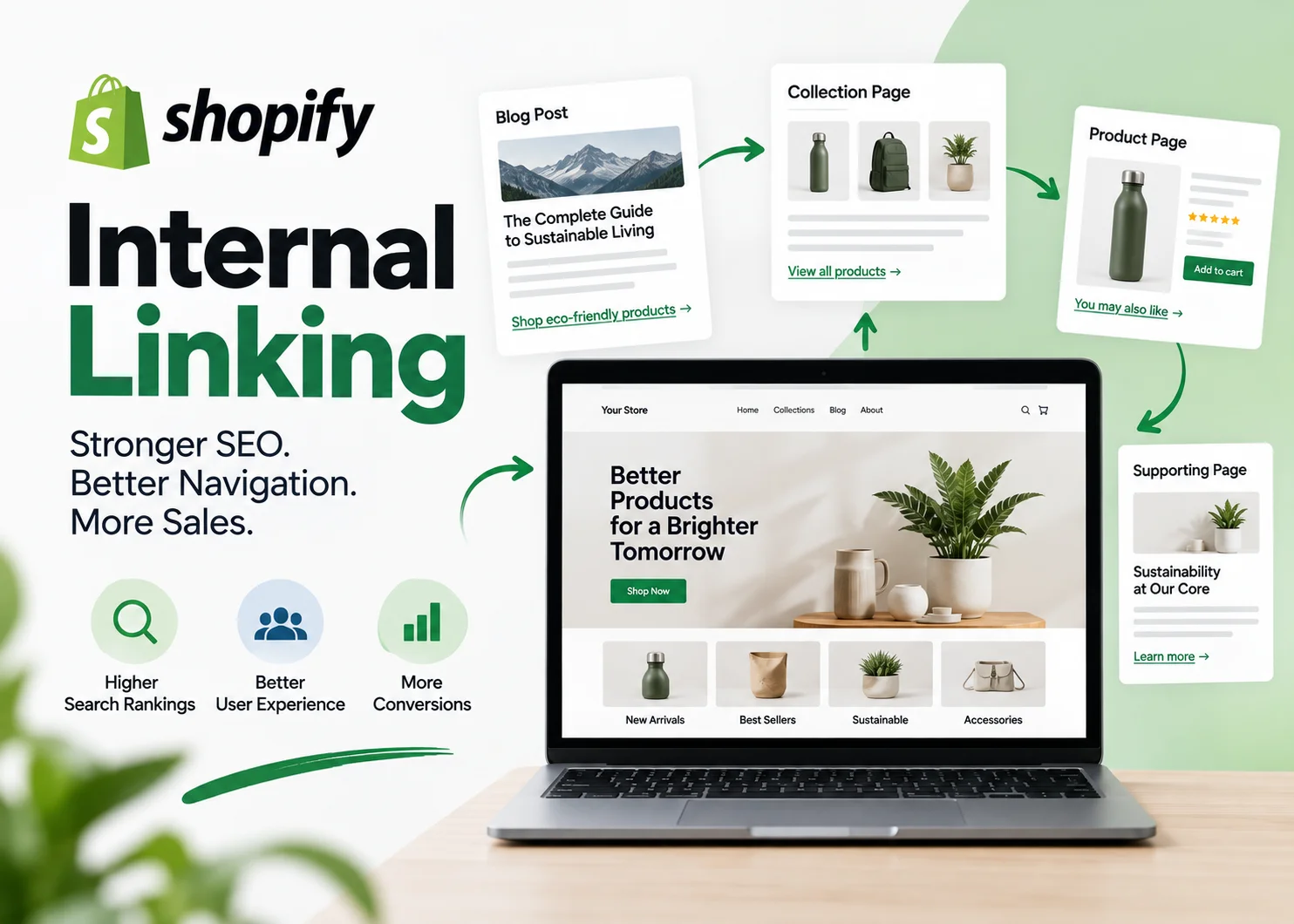
Shopify internal linking is the process of connecting pages within your own store so shoppers and search engines can move naturally between related content.
Done well, internal links help users discover products, collections, guides, and supporting information without getting lost. They also help search engines understand how your store is structured and which pages are most important.
The problem is that many Shopify stores grow without a deliberate linking system. New blog posts are published with no incoming links. Collection pages sit several clicks deep. Product pages become dead ends. Old links point to redirected or outdated URLs.
This guide explains how to build a practical Shopify internal linking strategy across blog posts, collections, products, navigation, breadcrumbs, and supporting pages.
What Is Shopify Internal Linking?
Internal linking means linking one page on your Shopify store to another page on the same domain.
Examples include:
- a blog post linking to a collection
- a blog post linking to a product
- a collection linking to a related collection
- a product linking back to its parent collection
- a navigation menu linking to major categories
- a breadcrumb trail linking back through the store hierarchy
Shopify’s current internal linking SEO guidance emphasizes site structure, contextual links, and helping search engines understand page importance.
For a broader foundation on link planning, see the NextWebOps guide to internal linking best practices.
Why Internal Linking Matters for Shopify SEO
It Helps Search Engines Discover Pages
Search engines find pages by following links.
If a new product, collection, or article has no internal links pointing to it, that page is harder to discover and may function like an orphan page.
This is especially important when publishing new content. A new article should not only contain links to older pages. Older relevant pages should also be updated to link back to the new article.
It Helps Search Engines Understand Site Structure
Internal links help communicate relationships between page types.
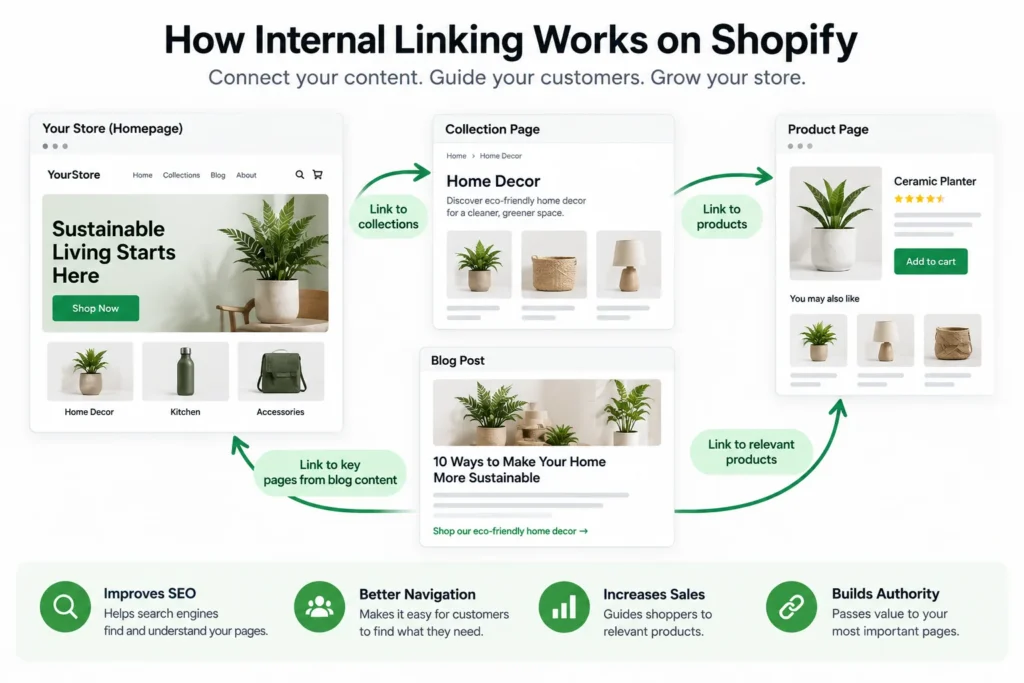
A simple ecommerce hierarchy might look like this:
Homepage → Collection → Product
Content can support that commercial structure:
Blog Post → Collection → Product
That pattern helps make the store easier to navigate while showing which pages belong together.
It Supports Important Commercial Pages
Some pages matter more than others.
A high-value collection or evergreen product category may deserve more internal support than a temporary page or low-priority SKU.
Relevant links from blog posts, category pages, and navigation can help reinforce those strategically important pages.
It Improves User Navigation
Internal linking is not only about search engines.
A shopper reading a buying guide should have an easy route to the relevant collection. A customer viewing a product may benefit from links to related products, sizing information, care instructions, or a parent category.
Good internal links reduce friction and create a more useful browsing path.
12 Shopify Internal Linking Best Practices
1. Build a Clear Store Hierarchy
Start with structure before adding individual links.
A simple hierarchy might be:
Home → Women’s Shoes → Trail Running Shoes → Specific Product
The goal is to keep important pages easy to reach without forcing users through unnecessary layers.
A complicated hierarchy can bury important categories and make both navigation and crawling less efficient.
2. Link Blog Posts to Relevant Collections
Blog content often attracts informational traffic, while collection pages serve stronger commercial intent.
That makes blog-to-collection linking one of the most useful internal linking patterns in ecommerce.
For example:
Blog post: How to Choose Trail Running Shoes
Internal link: Women’s Trail Running Shoes collection
This gives the reader a natural next step after learning what to look for.
Your Shopify blog SEO strategy should therefore include relevant links toward collections and products instead of treating informational content as an isolated traffic channel.
3. Link Blog Posts to Relevant Products
Direct blog-to-product links can work well when the product genuinely fits the context.
For example, an article about caring for leather boots could link to an appropriate cleaning kit or waterproofing product.
The key is relevance.
Do not force product links into every paragraph just because a product exists. The link should help the reader move from information to a useful commercial option.
4. Link Collection Pages to Related Collections
Collections should not always operate as isolated category pages.
Related collection links can help shoppers explore nearby categories.
For example:
- Women’s Running Shoes
- Trail Running Shoes
- Road Running Shoes
- Waterproof Running Shoes
A logical relationship between these pages can improve both product discovery and site structure.
This works especially well when implemented as part of your Shopify collection page SEO strategy.
5. Link Product Pages Back to Useful Collections
Product pages should not become dead ends.
Useful internal links from a product page might point to:
- the parent collection
- a related collection
- compatible products
- a sizing guide
- a care guide
- a relevant buying guide
This helps customers continue browsing even if the current product is not the right fit.
It also supports a stronger Shopify product page SEO structure by connecting individual products to the broader categories and content around them.
6. Use Descriptive Anchor Text
Anchor text is the clickable wording of a link.
Descriptive anchor text gives users and search engines more context than generic phrases.
Weak:
click here
Better:
women's waterproof trail running shoes
That does not mean every link should use the exact same keyword.
Natural variation is healthier and reads better.
For example, links to the same collection might use:
- women’s trail running shoes
- waterproof trail shoes
- our trail running collection
Choose wording based on the sentence, not on a rigid anchor formula.
7. Link to Canonical URLs
Internal links should point to the preferred version of a page whenever possible.
Shopify’s internal linking guidance specifically recommends linking to canonical URLs.
Avoid pointing internal links to:
- parameterized URLs
- filtered URLs that should not be treated as primary pages
- tracking URLs
- duplicate paths
- redirected URLs
If your preferred collection URL is:
/collections/trail-running-shoes
link directly to that version instead of a longer filtered or tracked variation unless there is a specific user reason to do otherwise.
8. Prioritize Important Commercial Pages
Not every URL deserves equal internal-link attention.
Prioritize pages that matter to the business, such as:
- strategic collection pages
- high-value product categories
- evergreen buying guides
- important service or support pages
- priority products where appropriate
This should still be done naturally.
Linking every article to the same category, regardless of context, creates a poor user experience and weakens the usefulness of your internal linking system.
9. Add Incoming Links to Every Important New Page
This is one of the most commonly missed steps in content publishing.
When a new article is published, most teams only think about the links inside that article.
That is only half the job.
After publishing, identify older relevant pages and add internal links into the new content.
For example, after publishing a new guide about Shopify internal linking, older posts about:
- Shopify blog SEO
- collection page SEO
- product page SEO
- on-page SEO
can be reviewed for natural opportunities to link back to it.
This prevents strong new articles from sitting with zero inbound links.
10. Use Breadcrumbs Where Appropriate
Breadcrumbs give users a visible path back through the store hierarchy.
For example:
Home → Women’s Shoes → Trail Running Shoes → Product
This can improve navigation and reinforce page relationships.
Breadcrumb implementation depends on the Shopify theme, so verify the actual front-end behavior rather than assuming every theme handles breadcrumbs the same way.
11. Fix Orphan Pages and Broken Internal Links
An orphan page has no meaningful internal links pointing to it.
Common Shopify examples include:
- old blog posts
- new collections
- recently launched products
- landing pages no longer in navigation
Broken internal links can also appear when:
- products are deleted
- collection handles change
- blog URLs change
- pages are consolidated
- old links point through redirects
A good audit should look for both missing inbound links and outdated destinations.
If your store has a large catalog with inconsistent linking, get help with Shopify internal linking implementation.
12. Audit Internal Links Regularly
Internal linking is not a one-time project.
Stores change constantly as new products, collections, articles, and campaigns are published.
Regular reviews should check:
- which pages have few or no incoming links
- broken internal links
- redirected internal links
- anchor text quality
- deep pages
- links to noncanonical URLs
- outdated navigation paths
- older articles that should link to newer content
This ongoing maintenance is especially important for stores publishing content frequently.
Shopify Internal Linking Examples
Blog Post to Collection
Page: How to Choose Hiking Boots
Link: Hiking Boots Collection
This gives an informational visitor a logical path toward shopping.
Blog Post to Product
Page: How to Clean Leather Boots
Link: Leather Boot Care Kit
The product is relevant because it solves the problem discussed in the article.
Collection to Product
Page: Men’s Running Shoes
Links: Individual shoe models
This is a standard commercial path and should remain easy to navigate.
Product to Collection
Page: XR200 Trail Running Shoe
Link: Trail Running Shoes Collection
This helps a shopper explore alternatives.
Collection to Related Collection
Page: Women’s Shoes
Link: Women’s Hiking Boots
This can be useful when the category relationship is clear.
How Many Internal Links Should a Shopify Page Have?
There is no universal number that every Shopify page should follow.
The right amount depends on:
- page length
- page type
- search intent
- available relevant destinations
- store structure
A short product description may only need a few useful internal links. A long buying guide may naturally support several more.
For blog content, a handful of highly relevant links is usually more useful than forcing dozens of unrelated destinations into the copy.
Do not add internal links just to reach a quota.
Every link should answer a simple question:
Would this destination genuinely help the reader at this point?
Shopify Internal Linking for Blogs, Collections, and Products
Blog Posts
Blog posts can link to:
- related articles
- relevant collections
- specific products
- buying guides
- supporting informational pages
They are often one of the best sources of contextual links because the anchor text can appear naturally within useful content.
Collection Pages
Collection pages can link to:
- child collections
- parent collections
- related categories
- buying guides
- featured products
These links should help category discovery rather than simply adding more SEO text.
Product Pages
Product pages can link to:
- parent collections
- compatible products
- related products
- sizing guides
- care guides
- relevant educational content
A strong Shopify architecture connects these page types together rather than optimizing each one in isolation.
Should You Use a Shopify Internal Linking App?
Internal linking apps can help at scale, especially when a store contains thousands of products and articles.
Automation can be useful for:
- finding linking opportunities
- adding controlled keyword-based links
- identifying pages with few internal links
- reducing repetitive manual work
But automated linking needs review.
Poor rules can create:
- irrelevant links
- too many links
- repetitive exact-match anchors
- links to the wrong page type
- links to filtered or noncanonical URLs
For smaller stores, a manual strategy may provide more control. For larger catalogs, automation can work well when combined with clear rules and regular QA.
Common Shopify Internal Linking Mistakes
- Using generic anchor text: Phrases like “click here” provide little context.
- Publishing new pages with no incoming links: New articles and collections should receive links from older relevant pages.
- Overusing exact-match anchors: Natural variation is better for readability.
- Linking only from blogs to products: Collections and related informational pages also need support.
- Leaving important collections orphaned: Strategic categories should be accessible from meaningful paths.
- Creating excessive click depth: Important pages should not be buried unnecessarily.
- Linking to redirected URLs: Update links to the final destination.
- Linking to parameter-heavy URLs: Prefer the intended canonical page when possible.
- Ignoring broken links: Deleted or renamed products can create poor user experiences.
- Stuffing footer links: Footer links should remain useful rather than becoming an SEO dumping ground.
- Over-automating: Internal linking apps still require human review.
Shopify Internal Linking Checklist
- Keep the store hierarchy clear.
- Link relevant blog posts to collections.
- Link blog posts to products when useful.
- Connect related collections.
- Link products back to useful collections.
- Use descriptive anchor text.
- Link to canonical URLs.
- Prioritize important commercial pages.
- Add incoming links to new content.
- Use breadcrumbs where appropriate.
- Find and fix orphan pages.
- Fix broken and redirected internal links.
- Review internal linking regularly.
Need help finding orphan pages, cleaning up outdated links, and connecting blogs, collections, and products? Discuss your Shopify internal linking workflow with NextWebOps.
Final Thoughts on Shopify Internal Linking
Strong Shopify internal linking is not about adding as many links as possible.
It is about building useful connections between pages so customers can move naturally through the store and search engines can understand the relationship between blogs, collections, products, and supporting content.
The most important habit is also one of the easiest to miss:
Every important new page should receive incoming links from older relevant content.
That simple step prevents newly published articles from becoming isolated and helps turn individual posts into a connected topic cluster.
NextWebOps helps ecommerce businesses and agencies implement internal links, update older content, improve anchor text, connect Shopify page types, and complete publishing QA.
Contact NextWebOps about your Shopify SEO structure.
Frequently Asked Questions
What is Shopify internal linking?
Shopify internal linking is the practice of linking pages within the same Shopify store, such as blogs to collections, collections to products, products to related categories, and navigation to important pages.
Does internal linking help Shopify SEO?
Internal links can help search engines discover pages, understand site structure, and identify relationships between content. They also improve navigation when the links are relevant to users.
How many internal links should a Shopify page have?
There is no fixed ideal number. Add links where they genuinely help the visitor and support the page’s purpose. Long guides can naturally contain more internal links than short product pages.
Should Shopify blog posts link to products?
Yes, when the product is relevant to the topic. A product link should provide a useful next step rather than being inserted only for SEO.
Should Shopify blog posts link to collections?
Yes. Blog-to-collection linking is especially useful when an informational article helps a reader understand a category and the collection provides the next commercial step.
What anchor text should I use for Shopify internal links?
Use descriptive wording that explains the destination naturally. Avoid relying on generic phrases such as “click here” and avoid forcing the exact same keyword into every link.
How do I find orphan pages in Shopify?
Use a site crawler, SEO auditing tool, or structured manual review to identify pages with no meaningful incoming internal links. Compare published products, collections, and blog posts against the site’s actual linking structure.
Should I use an internal linking app on Shopify?
An app can be useful for large stores, but automated links need rules and quality control. Review relevance, anchor text, destination URLs, and overall link volume before relying on automation.
Should internal links point to canonical URLs?
Yes, whenever possible. Internal links should generally point directly to the preferred canonical version of a page instead of unnecessary filtered, tracked, duplicate, or redirected URLs.
Do breadcrumbs help Shopify SEO?
Breadcrumbs can improve navigation and reinforce the relationship between products, collections, and higher-level categories. Their value comes primarily from clearer site structure and usability rather than being a standalone ranking tactic.
Leave a Reply