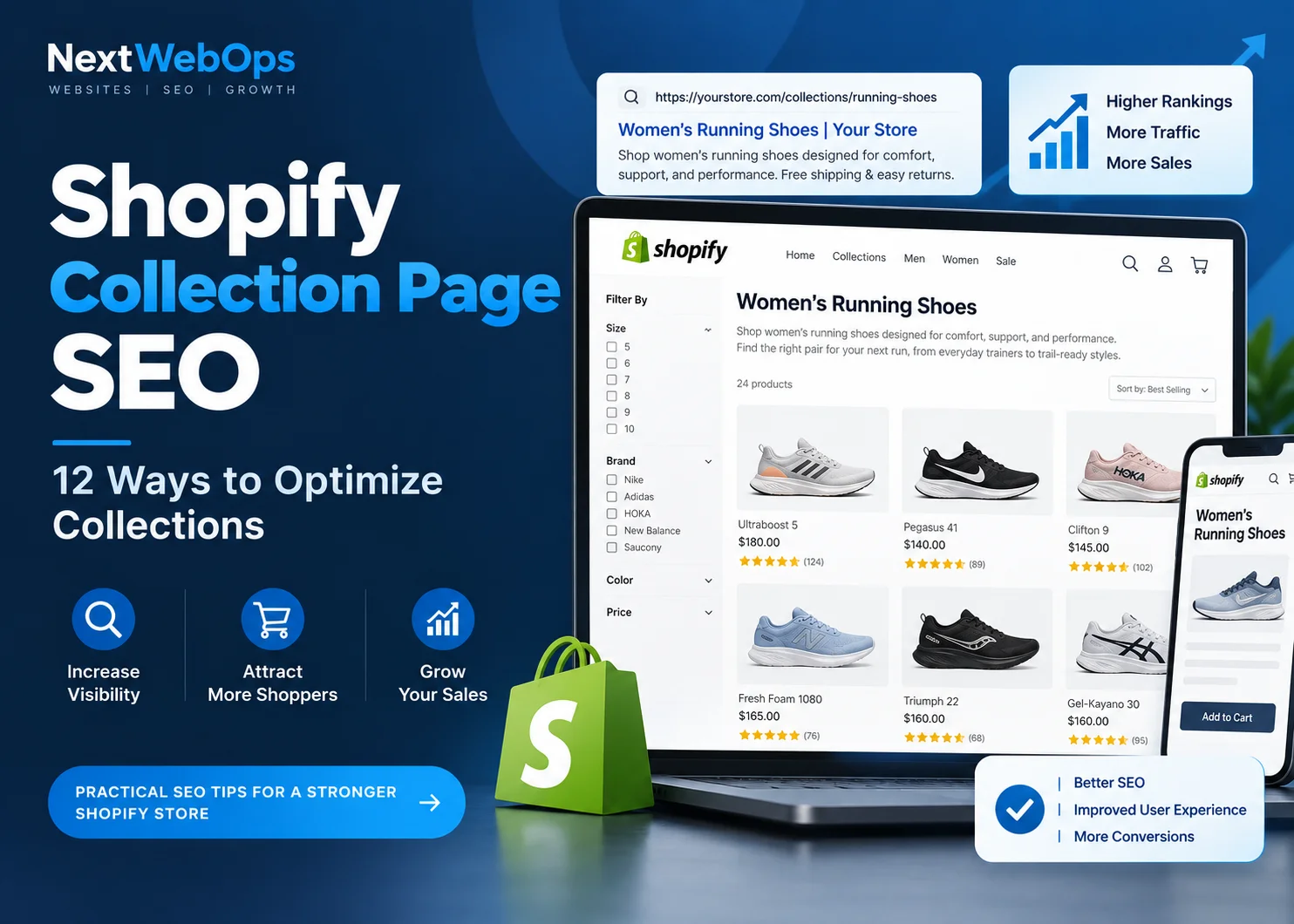
Shopify collection page SEO can help ecommerce stores attract shoppers who are searching for an entire product category rather than one specific item. An optimized collection page can target valuable commercial searches, organize related products, strengthen your site structure, and give shoppers a direct path from Google to products they are interested in buying.
But simply creating a collection and assigning products to it does not make the page search-engine optimized. The page still needs the right keyword targeting, title, description, metadata, internal links, images, technical setup, user experience, and final publishing checks.
In this guide, we’ll walk through 12 practical ways to optimize Shopify collection pages while keeping them useful for real shoppers.
What Is Shopify Collection Page SEO?
Shopify collection page SEO is the process of optimizing pages that group related products so they are easier for shoppers and search engines to understand.
Shopify calls these pages collections. On other ecommerce platforms, they are often called category pages.
For example, a shoe store might have individual product pages for specific running shoes while maintaining a collection page for women’s running shoes. Someone searching Google for “women’s running shoes” will often want to compare several options instead of landing on one specific shoe.
That makes a collection page a logical destination for many category-level commercial searches.
Shopify’s own ecommerce category page SEO guide explains that collection pages can group products around shared characteristics while creating opportunities to target searches potential customers use to find those products.
The goal is therefore not simply to make a collection “SEO friendly.” A strong collection page should simultaneously help search engines understand the category and help customers find the right products.
How to Optimize Shopify Collection Pages for SEO
1. Assign One Primary Keyword to Each Collection
Start by defining the main search topic each important collection should target.
If your collection contains women’s trail running shoes, for example, the primary keyword might be:
women’s trail running shoes
Related phrases could include:
- trail shoes for women
- women’s off-road running shoes
- lightweight women’s trail shoes
The purpose is not to force every variation into the description. Instead, build the page around one clear topic and use related terminology naturally where it helps describe the products.
Keyword mapping also helps prevent multiple collections from targeting virtually identical search intent.
Before creating a new collection, ask whether an existing page already answers the same search. If two collections contain similar products and target almost identical keywords, you may create unnecessary overlap between your own pages.
2. Create Collections Around Genuine Search and Shopping Intent
Creating more collection pages does not automatically produce more organic traffic.
A new collection should normally represent a category or subcategory that customers would genuinely find useful.
Before creating one, consider:
- Do customers actually look for this type of product?
- Is the intent different from an existing collection?
- Are there enough relevant products to make the page useful?
- Would the collection improve browsing and navigation?
For example, a large footwear store may reasonably maintain separate collections for road running shoes and trail running shoes because shoppers looking for those products have different needs.
Creating separate collection pages for every tiny variation of a product attribute, however, can leave you with thin and overlapping pages that are difficult to maintain.
Shopify’s current SEO guidance similarly recommends matching pages with search intent and building collection pages around broader product searches rather than treating every keyword variation as a reason to create another URL.
3. Write a Clear, Keyword-Relevant Collection Title
Your collection title should immediately tell visitors what products they will find.
Compare these examples:
Unclear: Performance Series
Clearer: Women’s Trail Running Shoes
The second title gives both customers and search engines much stronger context.
When the primary keyword naturally describes the category, using it in the title makes sense. What you should avoid is turning the heading into a list of keyword variations.
For example:
Poor: Women’s Trail Running Shoes | Best Women’s Trail Shoes | Cheap Trail Shoes for Women
That type of heading is difficult to read and provides little additional value.
Use a clear title that accurately represents the products on the page.
4. Add a Useful Shopify Collection Description
One of the most common missed opportunities on Shopify collection pages is leaving the description empty or filling it with generic text written only for search engines.
A useful description should establish what the collection contains and help shoppers determine whether they are in the right place.
For many stores, a short introduction above the product grid works well.
For example:
Shop women’s trail running shoes designed for grip, stability, and comfort across dirt paths, rocky routes, and technical terrain. Compare lightweight everyday trail shoes and rugged options built for longer adventures.
This introduces the category without forcing customers to scroll through a large block of content before seeing products.
If more explanation would genuinely help shoppers, you can provide additional content farther down the page. That content might discuss:
- materials
- sizing
- product differences
- common use cases
- buying considerations
- care instructions
- related product categories
There is no universal collection-description word count that every Shopify store needs to follow.
Write enough to make the category understandable and useful. Do not add 500 words simply because you believe search engines require a certain length.
5. Optimize the SEO Title and Meta Description
The visible collection title and the page’s search metadata serve related but different purposes.
Your SEO title should clearly represent the collection and encourage the right searcher to click. When it reads naturally, place the main keyword toward the beginning.
For example:
Women’s Trail Running Shoes | Brand Name
The meta description should provide a concise reason for a potential customer to visit the page. Depending on your store, that could mention relevant product types, materials, selection, shipping, sizing, or another genuine benefit.
Avoid copying identical metadata across many important collections. Each major collection should reflect its own products and search intent.
Before publishing, use this on-page SEO checklist to review titles, descriptions, headings, images, internal links, and other essential page elements.
6. Keep Collection URLs Short and Descriptive
A collection URL should be simple enough for a person to understand at a glance.
A clean example is:
/collections/womens-running-shoes
There is rarely a good reason to load the URL with promotional language, dates, or repeated keywords.
For example, avoid something like:
/collections/best-womens-running-shoes-cheap-running-shoes-sale-2026
However, do not change an established collection URL purely because you have found a slightly cleaner version.
If the existing page already receives traffic, has backlinks, appears in search results, or is extensively linked throughout your site, changing the URL creates additional work and risk. When a URL genuinely needs to change, make sure the old location redirects to the appropriate new page.
7. Strengthen Internal Links to Important Collections
A commercially important collection should not be buried deep inside the store with few links pointing to it.
Relevant internal links can come from:
- main navigation
- homepage category sections
- related collections
- buying guides
- blog articles
- appropriate product pages
- other relevant informational pages
Use anchor text that helps visitors understand where the link goes.
For example, a guide about choosing trail footwear could naturally link to a women’s trail running shoes collection instead of using generic anchor text such as “click here.”
Good internal linking also creates logical paths between informational and commercial pages.
A blog post may introduce a customer to a problem, a buying guide may help them compare solutions, and a collection page can then let them browse suitable products.
For a more detailed process, see these internal linking best practices.
8. Optimize Collection Images
Collection pages frequently contain banners, category graphics, product thumbnails, promotional images, and other visual assets.
Before publishing them:
- resize images to appropriate dimensions
- compress unnecessary file size
- use efficient formats such as WebP when appropriate
- choose short, descriptive filenames
- write useful alt text when alternative text is needed
- check how images display on mobile
For example:
womens-trail-running-shoes.webp
is more descriptive than:
IMG_5834.webp
Google’s official image SEO best practices recommend using short, descriptive filenames and useful alt text that describes the image in context.
Alt text should not become another place to stuff your target keyword repeatedly. Its primary job is to communicate what the image contains, including for visitors who cannot see the image.
For a practical implementation process, read the NextWebOps guide to image SEO.
9. Review Filters and Faceted Navigation
Filters make large Shopify collections easier to browse.
Customers may want to narrow products by:
- size
- color
- brand
- price
- material
- availability
- product features
The SEO challenge appears when combinations of filters, sorting options, or parameters generate many different URLs containing substantially similar products.
One collection could potentially generate URLs representing:
- black products
- black products in size medium
- black products in size medium below a certain price
- the same selection sorted from highest to lowest price
Google’s canonicalization guidance discusses duplicate and similar URLs, including situations where sorting and filtering can produce multiple URLs for substantially similar content.
That does not mean filters themselves are bad for SEO. They are often extremely useful to shoppers.
The goal is to understand which filtered URLs your store creates and decide which versions should be treated as important search destinations.
This is especially important on stores with large catalogs and extensive faceted navigation.
Shopify themes and filtering apps may generate URLs differently, so inspect the actual behavior of your own store rather than applying one technical rule to every Shopify website.
10. Review Structured Data
Structured data provides search engines with machine-readable information about the content of a page.
Depending on your Shopify theme and implementation, your store may already output structured data relating to:
- products
- breadcrumbs
- organization information
- other supported content types
More schema markup is not automatically better.
Google’s structured data guidelines require markup to accurately represent the page content and follow the requirements of the relevant structured-data feature.
Before installing another app or adding custom schema, inspect what your theme already generates. Multiple tools attempting to output the same information can make implementation more difficult to maintain.
After publishing, test important templates and investigate structured-data errors rather than assuming the markup is correct simply because it exists.
11. Improve the Shopping Experience on Mobile and Desktop
A collection page ultimately exists to help people find products.
SEO improvements should therefore support the shopping experience rather than interfere with it.
Review the page as a customer would.
Ask:
- Can shoppers quickly understand the category?
- Are products visible without excessive scrolling?
- Are filters genuinely useful?
- Is sorting easy to understand?
- Are product names and prices clearly displayed?
- Do product images help customers compare options?
- Does the page work comfortably on a phone?
Shopify’s category-page optimization guidance highlights factors such as useful descriptions, clear product information, sorting, product thumbnails, site speed, and mobile experience when assessing category pages.
Mobile presentation deserves particular attention.
A large desktop banner or long description may appear reasonable on a wide screen but consume most of the initial viewport on a phone. Similarly, a poorly designed filter interface can make browsing hundreds of products unnecessarily difficult.
Search visibility can bring someone to the collection page. The page itself still needs to help that visitor shop.
12. Complete a Final Shopify Collection Page SEO QA Check
SEO recommendations only create value when they are implemented correctly.
Before publishing a new collection or after making substantial changes, inspect the actual live page instead of assuming that everything entered in Shopify appears correctly on the storefront.
Review:
- collection title
- correct product assignments
- description formatting
- heading structure
- SEO title
- meta description
- collection URL
- internal links
- image filenames
- image alt text
- filter behavior
- structured data where relevant
- mobile display
- broken links
- canonical and indexability settings where relevant
- final live-page presentation
The difference between an SEO recommendation and a successfully optimized page is often implementation.
A structured on-page SEO audit can help identify problems that may be difficult to spot while working only inside the Shopify admin.
If your SEO strategy is ready but your team needs help implementing collection content, metadata, images, links, formatting, and final checks, get help with Shopify content implementation.
Shopify Collection Page SEO Example
Consider an ecommerce brand selling sustainable clothing.
The store wants to target people searching for organic cotton T-shirts.
A basic collection optimization plan might look like this:
- Primary keyword: organic cotton t shirts
- Collection title: Organic Cotton T-Shirts
- URL:
/collections/organic-cotton-t-shirts - Intro copy: a short explanation of the available organic cotton styles, fits, and colors
- Supporting content: useful information about fabric, fit, sizing, and care
- Internal links: links from sustainable clothing guides and related collections
- Images: appropriately sized and compressed files with descriptive filenames and useful alt text
- Metadata: a unique SEO title and description that accurately represent the collection
The page is not optimized simply because the phrase “organic cotton T-shirts” appears several times.
It becomes a stronger collection page when the keyword, products, content, metadata, images, internal links, navigation, and shopping experience all support the same intent.
Shopify Collection Page SEO Checklist
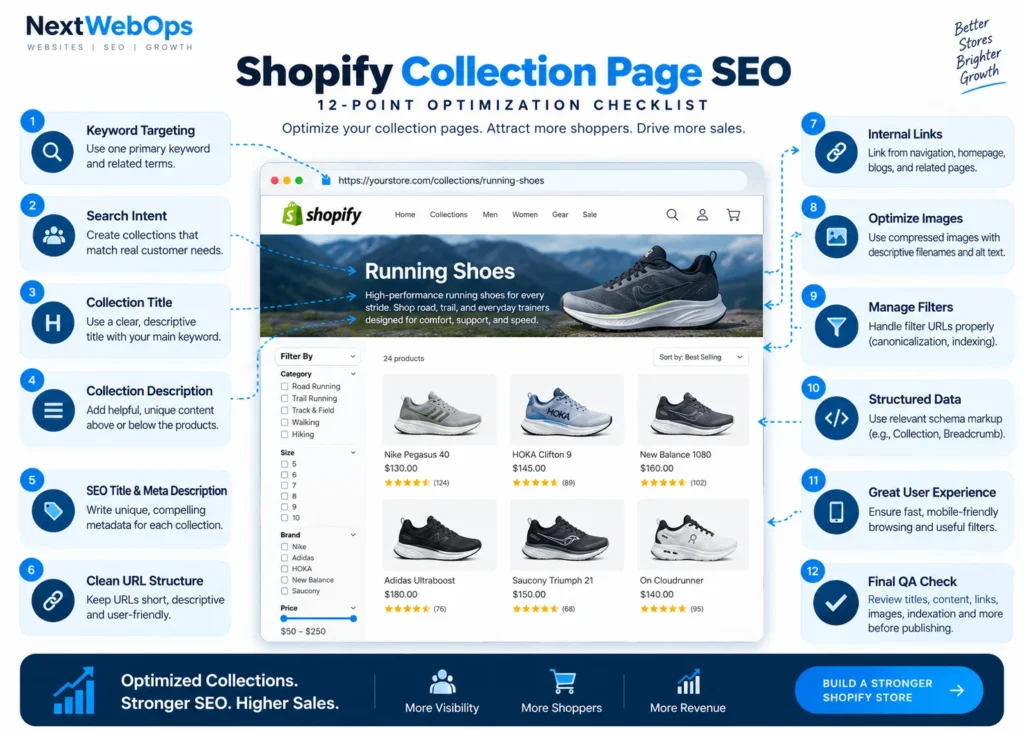
Use this checklist before publishing an important collection:
- Choose one clear primary keyword.
- Confirm that the collection matches genuine search and shopping intent.
- Use a descriptive collection title.
- Add useful and original collection copy.
- Write unique search metadata for important collections.
- Keep the collection URL simple where possible.
- Add relevant internal links.
- Optimize collection images.
- Review URLs generated by filters and sorting.
- Check structured data where appropriate.
- Test desktop and mobile usability.
- Complete final live-page publishing QA.
If managing these checks across dozens or hundreds of Shopify collections is taking time away from your core ecommerce work, discuss your Shopify publishing project with NextWebOps.
When Should You Create a New Shopify Collection?
A new collection makes sense when it represents a useful category that deserves its own browsing experience.
Consider creating one when:
- there is distinct customer or search demand
- the products form a meaningful group
- the collection improves site navigation
- you have enough relevant products to make the page useful
- the intent is not already adequately served by another collection
For example, separating men’s hiking shoes from men’s road running shoes makes sense because the products and customer needs are substantially different.
Creating five nearly identical pages purely to target small keyword variations is much harder to justify.
Before creating another collection, compare its proposed keyword, products, purpose, and content against your existing pages.
If you cannot clearly explain why a shopper needs the new page, reconsider whether it should exist.
Common Shopify Collection Page SEO Mistakes
Even well-designed Shopify stores can leave organic search opportunities on the table because small implementation problems accumulate across many collection pages.
Common mistakes include:
- using vague collection names that do not describe the products
- creating several collections around virtually identical search intent
- leaving important collection descriptions empty
- publishing large blocks of keyword-heavy text before the products
- reusing identical SEO titles and meta descriptions
- uploading oversized or poorly named images
- using weak internal-link structures
- ignoring filter-generated URLs
- adding unnecessary structured data without checking existing markup
- testing the Shopify admin but not the live storefront
Most of these problems are not solved by installing another SEO app. They require consistent page-level implementation and QA.
Final Thoughts on Shopify Collection Page SEO
Effective Shopify collection page SEO goes far beyond putting a target keyword into a description.
A strong collection page combines search intent, sensible product grouping, useful content, descriptive metadata, optimized images, internal links, manageable filtering, good mobile usability, and careful publishing QA.
That combination gives search engines clearer context while making it easier for shoppers to browse relevant products.
For stores managing dozens or hundreds of collections, consistency becomes especially important.
One missing meta description may not cause a major problem. Repeated issues involving metadata, images, internal links, formatting, duplicate URLs, or publishing errors across a large catalog can become much more significant.
NextWebOps helps businesses and agencies with Shopify content publishing, on-page SEO implementation, metadata, image optimization, internal linking, content formatting, and publishing QA.
Contact NextWebOps about your Shopify project.
Frequently Asked Questions
Are Shopify collection pages good for SEO?
They can be particularly useful for category-level searches where a shopper wants to compare multiple products instead of viewing one specific item. Their organic performance still depends on factors such as search demand, relevance, competition, content quality, site authority, internal linking, and technical implementation.
How much content should a Shopify collection page have?
There is no universal word count that every Shopify collection page needs. Use enough content to explain the category and help customers. A straightforward collection may only need a concise introduction, while a more complicated product category may benefit from additional buying information farther down the page.
Should a Shopify collection description go above or below the products?
A practical approach is to place a concise introduction above the product grid so customers immediately understand the category. If additional information is useful, longer supporting content can appear below the products. The goal is to provide context without unnecessarily delaying access to the items shoppers came to browse.
Should every Shopify collection target a different keyword?
Important collections should generally serve a distinct purpose and search intent. Closely related vocabulary will naturally overlap, but creating multiple near-identical collections solely to target minor variations of the same keyword can create unnecessary competition between your own pages.
Can Shopify filters cause SEO problems?
Filters can generate multiple URLs containing very similar product selections. Stores with extensive filtering should review how these URLs are crawled, indexed, internally linked, and canonicalized. The appropriate setup depends on the store’s catalog, theme, apps, and filtering system.
Does Shopify have built-in SEO features?
Shopify includes useful SEO functionality such as editable search listing information and ecommerce-friendly site architecture. However, the platform cannot determine your complete keyword strategy, write useful collection content, create a thoughtful internal-link structure, optimize every visual asset, or perform detailed publishing QA for you. Those tasks still require planning and implementation.
What is the difference between a Shopify collection page and a product page?
A product page focuses on one specific product, while a collection page groups several related products together. Product pages often target searches for specific items, models, or product names, while collection pages are commonly better suited to broader category searches where customers want to compare multiple options.
Leave a Reply