Your Shopify homepage is often the strongest and most visited page on your store. It introduces your brand, directs shoppers to important collections, and helps search engines understand what your business sells.
However, an attractive homepage is not automatically an SEO-friendly homepage. Large banners, vague headings, limited written content, and weak internal links can make it difficult for Google to understand the page—even when it looks impressive to visitors.
This Shopify homepage SEO guide explains how to optimize every important element, from your target keyword and metadata to homepage copy, images, internal links, loading speed, and indexing.
What Is Shopify Homepage SEO?
Shopify homepage SEO is the process of improving your store’s homepage so that search engines can understand, crawl, index, and rank it for relevant searches.
It includes optimizing:
- The SEO title and meta description
- The main heading and visible page content
- Images and alt text
- Navigation and internal links
- Page speed and mobile usability
- Structured data and technical settings
Your homepage normally targets the broad topic that represents your entire store. Individual product and collection keywords should usually be assigned to the relevant product or collection pages.
For example, a store selling handmade leather products might target “handmade leather goods” on its homepage. More specific terms such as “handmade leather wallets” and “leather laptop bags” would be better suited to dedicated collection pages.
Why Your Shopify Homepage Matters for SEO
The homepage is commonly the central point of a Shopify store. It usually earns more backlinks than other pages and passes authority to collections, products, blog posts, and important information pages through internal links.
An optimized homepage can help you:
- Rank for your brand name and main product category
- Explain your core offer to search engines
- Direct visitors to priority collections and products
- Build trust with new shoppers
- Improve engagement and conversions
- Distribute SEO value across your store
Homepage SEO is not only about rankings. A clear page also helps visitors immediately understand what you sell, why they should trust you, and where they should go next.
1. Choose the Right Primary Keyword
Before changing headings or metadata, decide what your homepage should rank for. Choose one main keyword theme that accurately describes the overall store.
You can use Google Keyword Planner to discover related search terms, then compare them with the language customers use when describing your products.
The keyword should be:
- Relevant to most of your product range
- Closely connected to what customers want to buy
- Broad enough to represent the business
- Specific enough to attract suitable shoppers
- Realistic for your store’s current authority
Avoid targeting a very broad term simply because it has high search volume. A small specialty store is unlikely to compete for a keyword such as “shoes,” but it may have a better opportunity with “handmade women’s leather shoes.”
Shopify Homepage Keyword Example
Imagine that you operate a sustainable skincare store:
- Too broad: Skincare
- Better homepage keyword: Natural skincare products
- Supporting terms: Vegan skincare, organic face care, clean beauty products
- Collection keywords: Natural face cleansers, vegan moisturizers, organic face serums
The homepage introduces the broader topic, while each collection page targets a more focused search.
Use your main keyword naturally. Repeating it in every paragraph, heading, and image description will not improve the page and may make your content look unnatural.
2. Optimize the Shopify Homepage SEO Title
The SEO title appears in search results and browser tabs. It is one of the clearest signals describing the topic of your homepage.
To edit it in Shopify, go to:
Shopify Admin → Online Store → Preferences
Look for the homepage title and meta description section. The exact wording of the menu can vary as Shopify updates its interface.
A good homepage title should:
- Include the main product category or primary keyword
- Describe what the store offers
- Include the brand name
- Sound natural and encourage clicks
- Remain concise enough to display clearly in search results
A useful formula is:
Primary Product Category or Benefit | Brand Name
Shopify Homepage Title Examples
Weak: Home | Green Glow
Improved: Natural Skincare Products | Green Glow
Weak: Welcome to Our Store
Improved: Handmade Leather Bags and Accessories | Oak & Hide
Weak: Best Products at Great Prices
Improved: Eco-Friendly Kitchen Products | Earthwise Home
Do not fill the title with several versions of the same keyword. One clear phrase and your brand name are usually enough.
3. Write a Compelling Meta Description
The meta description is the short summary that may appear under your title in search results. It is not a direct ranking factor, but a clear and persuasive description can improve clicks from suitable searchers.
Your Shopify homepage meta description should include:
- The main type of product you sell
- A meaningful customer benefit
- An important selling point
- A natural call to action
Aim for approximately 150–160 characters, but focus on clarity rather than forcing an exact length. Google may rewrite the description depending on the search.
Shopify Homepage Meta Description Template
Shop [main product category] from [brand name]. Discover [main benefit or selling point] with [shipping, guarantee, quality, or other incentive].
Examples:
- Shop natural skincare products from Green Glow. Discover vegan formulas made with carefully selected ingredients and enjoy free US shipping over $50.
- Explore handmade leather bags from Oak & Hide. Find durable, timeless designs crafted for everyday use and backed by easy returns.
- Shop eco-friendly kitchen products from Earthwise Home. Reduce everyday waste with practical reusable essentials delivered to your door.
Write for potential customers first. A description that reads like a list of keywords is unlikely to earn clicks.
4. Use One Clear Homepage H1
The H1 is the main visible heading on the page. It should clearly explain the store’s primary offer.
Many Shopify themes use the logo, store name, or hero-banner text in a way that makes the H1 unclear. Check your theme to confirm which element is actually marked as the H1.
In most cases, use one clear H1 on the homepage. It can include your main keyword or a close variation, but it should also make sense to visitors.
Weak H1: Welcome to Our Store
Better H1: Natural Skincare for a Simpler Daily Routine
Weak H1: Discover the Difference
Better H1: Handmade Leather Bags Built for Everyday Use
Your SEO title and H1 do not need to be identical. The title is written mainly for search results, while the H1 introduces the page to visitors.
5. Add Useful SEO Copy to the Homepage
Some Shopify homepages depend almost entirely on images, product cards, and buttons. Although this can create a clean design, it may give search engines very little information about the store.
Add concise, useful text explaining:
- What your business sells
- Who the products are for
- What makes the brand different
- Which major product categories are available
- Why customers should choose your store
This does not mean adding a thousand-word essay beneath your products. A few focused sections can provide context without making the page feel crowded.
Where to Place Homepage SEO Content
You can naturally include useful copy in:
- The hero section
- A short introduction below the hero
- Featured collection sections
- Benefit or unique-selling-point sections
- A short brand story
- A homepage FAQ section
Avoid hiding a large block of keyword-heavy content at the bottom of the page merely for search engines. Every section should provide genuine value to shoppers.
6. Optimize Homepage Images
Homepage images strongly affect appearance and loading speed. Large hero banners and sliders are among the most common reasons Shopify homepages load slowly.
For better image SEO and performance:
- Resize images to the dimensions actually needed by your theme
- Compress files before uploading them
- Use WebP or another suitable modern format
- Give files clear, descriptive names
- Add helpful alt text when an image provides meaningful information
- Leave alt text empty for purely decorative images when appropriate
- Check how banners crop on desktop and mobile
For example, replace a filename such as IMG_4582.jpg with handmade-brown-leather-tote.webp.
Alt text should describe what is visible and relevant:
Good: Woman carrying a handmade brown leather tote bag
Poor: Leather bag best leather bag handmade bag buy leather bag
Do not insert the same keyword into every image description. For a deeper walkthrough, see our guide to image SEO.
7. Build a Clear Homepage Structure
A logical layout helps visitors find products and helps search engines understand the relationship between different sections.
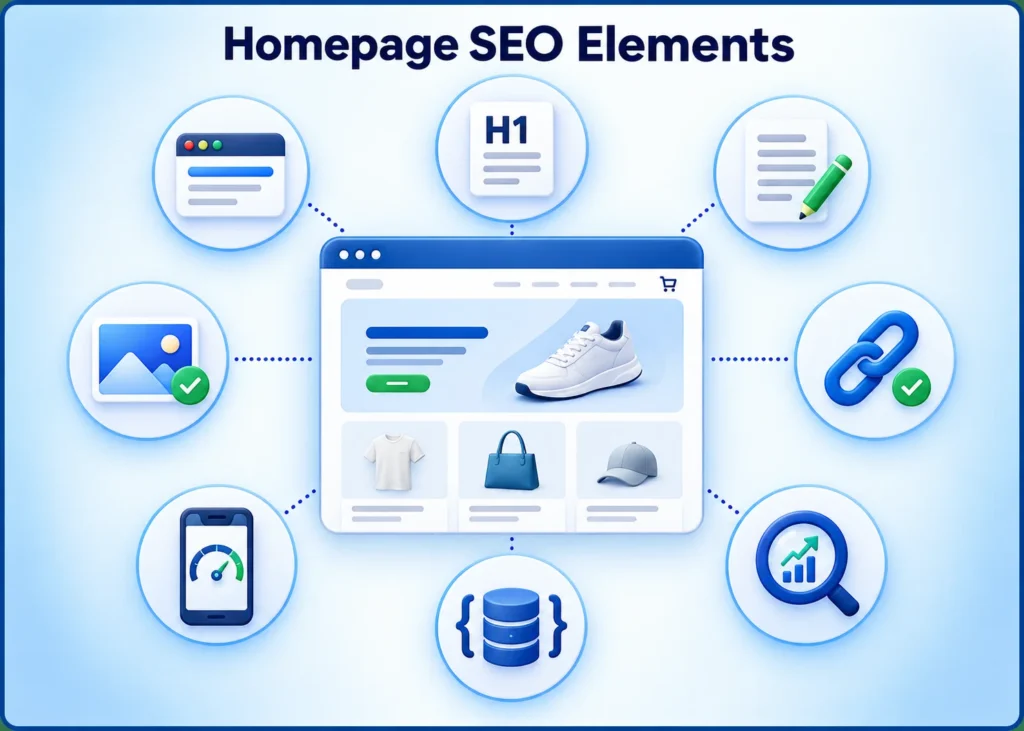
A practical Shopify homepage structure may include:
- Announcement bar, when necessary
- Header and main navigation
- Hero section with a clear H1 and primary call to action
- Featured collections or best-selling products
- Main customer benefits or unique selling points
- Reviews, ratings, or other trust signals
- Short brand introduction
- Helpful content or frequently asked questions
- Footer navigation
Place the most important information and shopping paths early on the page. Visitors should not need to scroll through several promotional banners before discovering what the store sells.
8. Improve Shopify Homepage Internal Linking
Internal links help visitors navigate your store and show search engines which pages are important. Your homepage should link to priority collections and other useful pages without becoming overcrowded.
Consider linking to:
- Main product collections
- Best-selling or featured products
- Buying guides and helpful blog posts
- About, contact, shipping, and return pages
- Current promotions when relevant
Use descriptive anchor text. “Shop women’s leather bags” provides more context than “Click here.”
Avoid placing links to every product on the homepage. Focus on your major categories and strongest customer journeys. You can learn more in our guide to internal linking best practices.
9. Add Relevant Structured Data
Structured data gives search engines standardized information about your business and website. Depending on your theme and setup, your homepage may use Organization and Website schema.
Shopify themes often generate some structured data automatically. Before installing an SEO app or adding custom code, check what your theme already provides. Duplicate or conflicting markup can create unnecessary errors.
Do not add Product schema to the homepage simply because products appear there. Product markup should represent a specific product on the appropriate product page. After making changes, test the page with Google’s Rich Results Test and review any warnings carefully.
10. Improve Homepage Speed and Core Web Vitals
A visually impressive homepage can still frustrate shoppers if it loads slowly. Speed also affects mobile usability, engagement, and conversions.
Common causes of a slow Shopify homepage include:
- Oversized hero images
- Autoplay background videos
- Multiple sliders or carousels
- Too many Shopify apps
- Scripts left behind by removed apps
- Excessive tracking tools
- Too many font styles and weights
- Large pop-ups or promotional widgets
Start with the elements that have the greatest impact. Compress the hero image, remove unnecessary sliders, review installed apps, and limit scripts that do not support an important business goal.
Test the homepage with Google PageSpeed Insights. Pay particular attention to mobile results because many ecommerce visitors browse and buy using phones.
11. Make the Homepage Mobile-Friendly
A homepage that looks good on a desktop can still be difficult to use on a smaller screen. Review the real mobile experience rather than relying only on the theme editor preview.
Check that:
- Text is readable without zooming
- Buttons are large enough to tap
- Menus are easy to open and use
- Hero text remains visible over the image
- Important calls to action appear early
- Images crop correctly
- Pop-ups do not cover the screen
- Sections do not create excessive scrolling
- The page loads quickly on mobile data
Mobile optimization is not a separate SEO task. It should be part of every decision involving design, images, content, and navigation.
12. Check Indexing and Technical SEO
Even excellent homepage content cannot rank if technical settings prevent search engines from accessing or indexing it.
Confirm that:
- The homepage returns a successful 200 status
- It does not contain a
noindexdirective - Its canonical tag points to the correct homepage URL
- HTTPS works without certificate or redirect errors
- The preferred domain version is used consistently
- The store is no longer protected by a storefront password
- Important resources load correctly for search engines
- The site is usable on mobile devices
Shopify automatically creates and updates a sitemap, normally available at:
https://yourstore.com/sitemap.xml
Submit this sitemap through Google Search Console. Shopify manages it automatically as eligible products, collections, pages, and blog posts change.
For a broader review of page-level issues, follow our on-page SEO audit guide.
13. Submit and Monitor the Homepage in Google Search Console
Google Search Console helps you confirm whether Google can access the homepage and shows how it performs in organic search.
After verifying your store:
- Submit the Shopify sitemap.
- Use URL Inspection to check the homepage.
- Review the declared and selected canonical URLs.
- Request indexing after important homepage changes.
- Monitor impressions, clicks, click-through rate, and average position.
- Review the search queries generating homepage visibility.
Requesting indexing does not guarantee immediate indexing or higher rankings. Google still evaluates page quality, relevance, site authority, competition, and technical accessibility.
Use performance data to improve the page over time. For example, strong impressions with a low click-through rate may indicate that your title or description needs improvement. Irrelevant queries may suggest that the page’s topic is not clear enough.
Shopify Homepage SEO Mistakes to Avoid
Watch for these common problems:
- Targeting several unrelated primary keywords
- Using the logo or store name as the only meaningful H1
- Publishing almost no visible text
- Copying descriptions directly from suppliers
- Stuffing keywords into headings and image alt text
- Linking every product from the homepage
- Installing multiple apps that perform the same SEO task
- Ignoring mobile speed and usability
- Optimizing metadata but neglecting visible content
- Using the same title across several pages
- Adding schema without checking existing theme markup
SEO should improve the clarity and usefulness of your homepage. If an optimization makes the page harder to read, navigate, or trust, reconsider it.
Shopify Homepage SEO Checklist
Use this checklist when reviewing your homepage:
-
Select one relevant primary keyword theme
-
Assign more specific keywords to collections and products
-
Write a clear, unique SEO title
-
Create a persuasive meta description
-
Use one descriptive H1
-
Add helpful visible homepage copy
-
Link to priority collections and products
-
Use descriptive internal-link anchor text
-
Resize and compress large images
-
Review filenames and image alt text
-
Test the layout on real mobile devices
-
Remove unnecessary apps, sliders, and scripts
-
Test loading speed and Core Web Vitals
-
Check structured data for duplication or errors
-
Confirm the canonical homepage URL
-
Make sure the homepage is indexable
-
Submit the sitemap to Google Search Console
-
Inspect the homepage after major updates
-
Monitor search queries, clicks, and conversions
Frequently Asked Questions
Does Shopify have built-in SEO?
Yes. Shopify automatically handles several technical elements, including sitemap generation, canonical tags, and editable homepage metadata. However, store owners still need to choose keywords, write useful content, optimize images, improve internal links, review theme output, and monitor performance.
How do I change my Shopify homepage SEO title?
Go to Shopify Admin → Online Store → Preferences, find the homepage title and meta description section, update the title, and save your changes. Shopify’s menu wording may change over time, so use the admin search if you cannot find the setting.
What keyword should my Shopify homepage target?
Choose a keyword that describes your store’s overall product range and matches what your ideal customers search for. Use more specific terms for individual product and collection pages.
How long should a Shopify homepage title be?
Keep it concise enough to communicate the main offer clearly in search results. A length of around 50–60 characters often works well, but clarity and relevance are more important than following an exact character limit.
How much text should a Shopify homepage contain?
There is no universal word count. Include enough original text to explain what you sell, who it is for, what makes the store different, and where shoppers should go next. Several short, useful sections are generally better than one large block written only for SEO.
Should my Shopify store name be the H1?
Usually, the H1 should explain the store’s primary offer rather than showing only the brand name. The logo and other branding already communicate the store name. A descriptive H1 gives visitors and search engines more useful context.
How long does Shopify SEO take to work?
Search engines may discover changes within days or weeks, but meaningful ranking improvements often take longer. Competition, website authority, content quality, backlinks, technical health, and the age of the store all influence the timeline.
Do I need a Shopify SEO app?
Not always. Shopify and many themes already handle several basic SEO elements. An app may help with specific tasks, but it cannot replace keyword research, useful content, logical site structure, quality links, and regular performance monitoring. Review what your theme already does before installing another app.
Build a Homepage for Search Engines and Shoppers
Effective Shopify homepage SEO is not a single setting. It combines keyword targeting, useful content, clear headings, optimized images, internal links, mobile usability, page speed, and sound technical setup.
Begin by making the page immediately understandable. Visitors should know what you sell, why your products are worth considering, and which collection or product they should explore next. When that information is presented clearly, search engines also receive stronger signals about the page’s purpose.
Review the homepage regularly as your products, customer needs, and store strategy change. Small improvements to titles, content, images, links, and performance can create a stronger foundation for the rest of your Shopify SEO. Our website maintenance checklist can help you plan these ongoing reviews.
Need help improving your Shopify content and on-page SEO? Discuss your project.
Leave a Reply