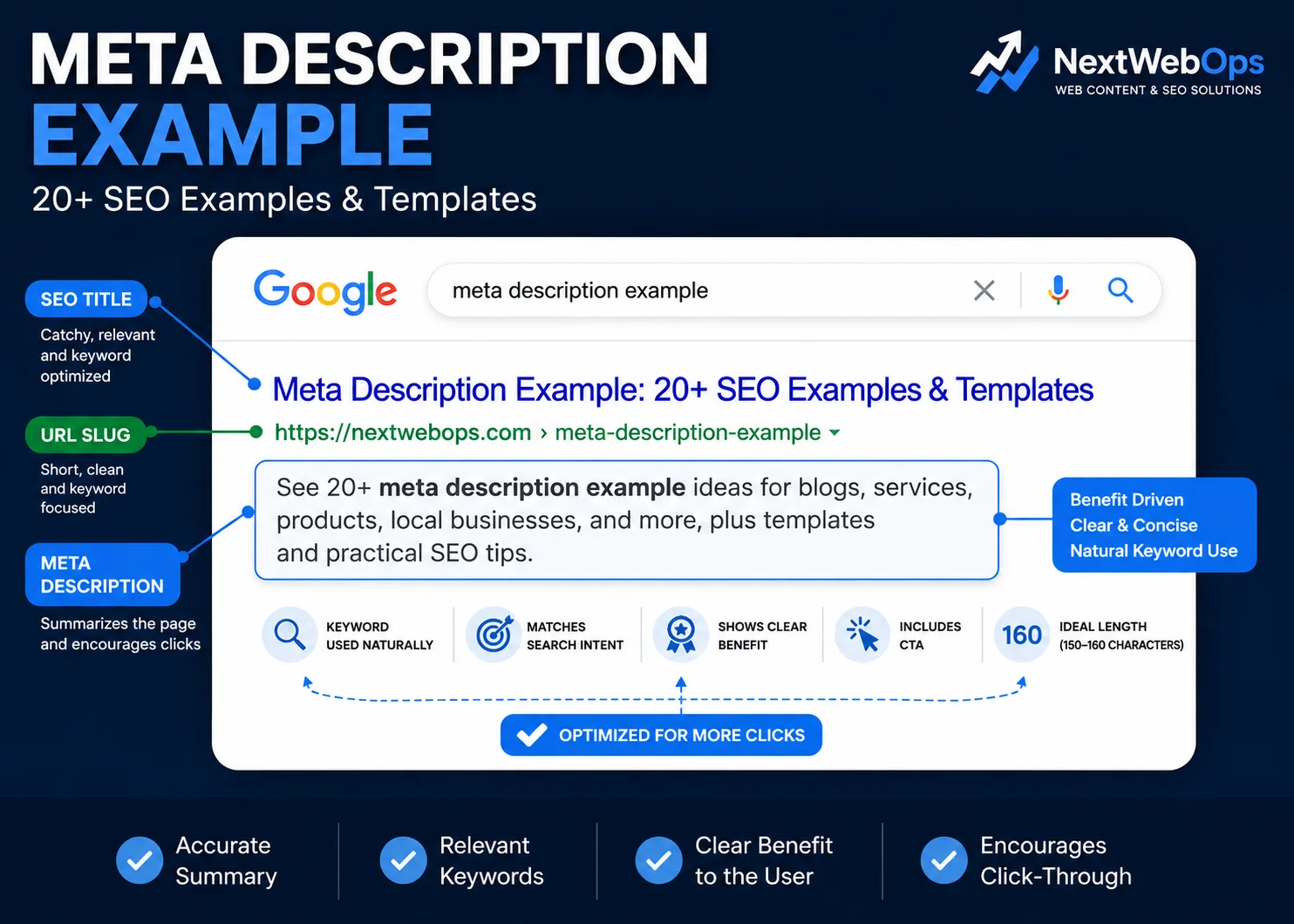
If you are looking for a meta description example, the most useful approach is to see how descriptions change depending on the type of page you are optimizing.
A homepage, blog post, service page, product page, and local business page should not all use the same formula. Each page has a different purpose, audience, and search intent.
In this guide, you will find more than 20 practical meta description examples, reusable templates, good-versus-bad comparisons, and tips for writing descriptions that accurately represent your pages.
What Is a Meta Description?
A meta description is a short piece of HTML that describes the content of a webpage. Search engines may use it as part of the snippet shown beneath your page title in search results.
A typical meta description tag looks like this:
<meta name="description" content="Learn how to optimize your website with practical SEO tips, examples, and publishing best practices.">
The important word is may. Google does not guarantee that the description you write will always appear exactly as entered. In some searches, Google may generate a different snippet from visible page content if it believes another section better matches the user’s query.
That means a good meta description should be useful and accurate, but it should not be treated as a guaranteed search-result message.
Meta Description Examples by Page Type
The best meta description depends on the role of the page. These examples show how the structure can change across common website types.
1. Homepage Meta Description Example
Example:
Website content management and publishing support for WordPress, Shopify, and Webflow. Keep your pages optimized, organized, and up to date.
Why it works: It explains what the business does, names the main platforms, and gives visitors a clear idea of the benefit.
2. Small Business Homepage Meta Description Example
Example:
Professional accounting services for small businesses, including bookkeeping, payroll, tax support, and monthly financial reporting.
Why it works: It is specific about the audience and services rather than using vague phrases such as “trusted business solutions.”
3. Service Page Meta Description Example
Example:
Get on-page SEO implementation for titles, metadata, headings, images, internal links, and content updates across your website.
Why it works: It describes the service clearly and names the specific tasks a potential client may need.
4. Local Service Business Meta Description Example
Example:
Book residential plumbing services in Toronto for leak repairs, fixture installation, drain problems, and routine maintenance.
Why it works: It combines the service, location, and common customer needs without unnecessary promotional language.
5. Blog Post Meta Description Example
Example:
Learn how to improve internal linking with practical tips for anchor text, site structure, link placement, and content discovery.
Why it works: It tells the searcher exactly what they will learn and includes several useful subtopics.
6. How-To Article Meta Description Example
Example:
Learn how to optimize images for SEO step by step, including filenames, alt text, compression, dimensions, and WebP formatting.
Why it works: The description reflects the informational intent and previews the main steps covered in the article.
7. Ecommerce Product Page Meta Description Example
Example:
Shop a lightweight waterproof hiking jacket with adjustable cuffs, breathable fabric, and multiple sizes for everyday outdoor use.
Why it works: It focuses on product characteristics and use cases instead of filling the description with generic sales language.
8. Shopify Product Meta Description Example
Example:
Shop our ceramic coffee mug with a matte finish, comfortable handle, and 12 oz capacity. Available in multiple colors.
Why it works: It provides useful product details that can help a shopper decide whether the page is relevant.
9. Shopify Collection Page Meta Description Example
Example:
Browse men’s running shoes for road, trail, and everyday training. Compare cushioning, support, colors, and sizes across the collection.
Why it works: Collection pages should describe the range rather than focusing on one individual product.
10. Ecommerce Category Page Meta Description Example
Example:
Explore office chairs for home and business workspaces, including ergonomic, mesh, executive, and adjustable seating options.
Why it works: The description reflects category-level intent and communicates the variety available.
11. SaaS Meta Description Example
Example:
Manage projects, tasks, deadlines, and team communication from one workspace built for small and growing remote teams.
Why it works: It quickly explains the product, its core functions, and the audience it serves.
12. About Page Meta Description Example
Example:
Learn about our team, how the company started, the clients we serve, and the principles behind our website management services.
Why it works: An About page does not need aggressive keyword targeting. Its job is to explain what visitors will discover.
13. Contact Page Meta Description Example
Example:
Contact our team to discuss website publishing, content updates, on-page SEO implementation, migration, or ongoing content management.
Why it works: It tells users what they can contact the business about and sets clear expectations.
14. Landing Page Meta Description Example
Example:
Get help migrating website content while preserving page structure, images, links, formatting, and essential metadata.
Why it works: It stays focused on the landing page offer and avoids unrelated services.
15. Lead Generation Page Meta Description Example
Example:
Request a website content audit to identify outdated pages, inconsistent formatting, missing metadata, and publishing issues.
Why it works: The action and expected outcome are both clear.
16. WordPress Service Meta Description Example
Example:
Get WordPress content publishing support for formatting, internal links, images, metadata, page updates, and final publishing QA.
Why it works: It targets a specific platform and gives potential clients a concrete picture of the service.
17. Portfolio Page Meta Description Example
Example:
View selected web design and development projects for service businesses, ecommerce brands, and growing companies.
Why it works: It communicates what the portfolio contains without adding unnecessary detail.
18. Case Study Meta Description Example
Example:
See how a website content cleanup improved page consistency, internal linking, metadata coverage, and the publishing workflow.
Why it works: It previews the problem and outcome while encouraging the reader to explore the case study.
19. FAQ Page Meta Description Example
Example:
Find answers to common questions about website publishing, SEO implementation, content updates, turnaround, and ongoing support.
Why it works: It explains what users can expect to find without overcomplicating the copy.
20. Resource Page Meta Description Example
Example:
Explore practical website publishing and SEO resources covering metadata, images, internal links, formatting, audits, and maintenance.
Why it works: It summarizes a broad resource hub while remaining descriptive.
21. Location Page Meta Description Example
Example:
Explore commercial cleaning services in Vancouver for offices, retail spaces, clinics, and other business properties.
Why it works: The service and location are both clear without awkwardly repeating the city name.
22. Comparison Page Meta Description Example
Example:
Compare WordPress and Webflow for content management, publishing workflows, SEO control, maintenance, and day-to-day updates.
Why it works: It matches comparison intent and tells the searcher which factors the page evaluates.
Good vs Bad Meta Description Examples
A useful meta description should sound natural, accurately represent the page, and provide enough detail to help a searcher understand what they will find.
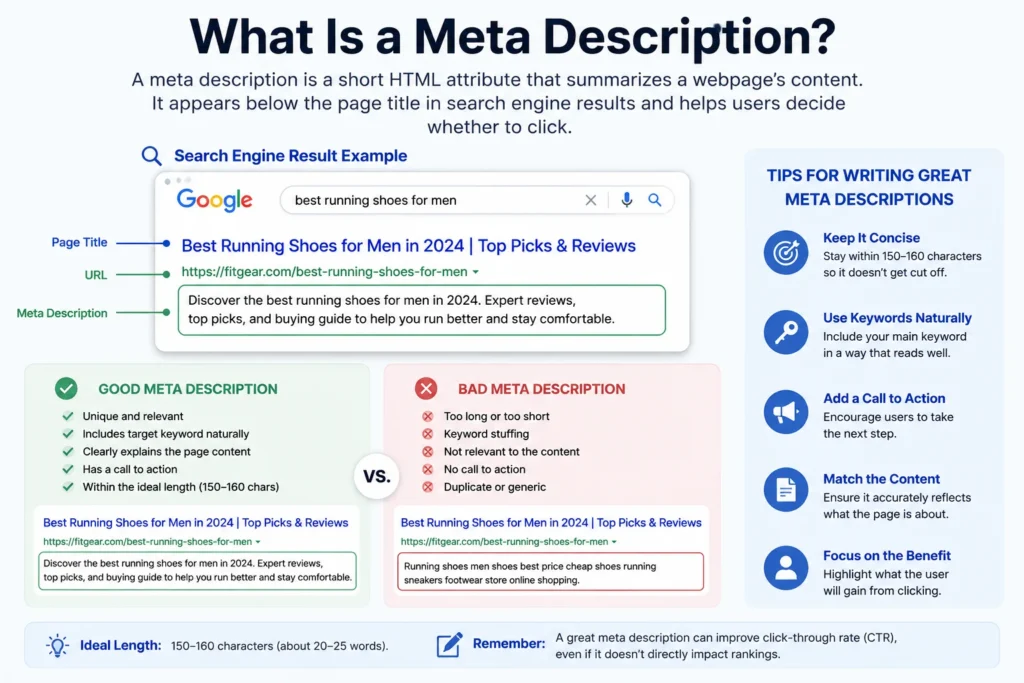
Example 1: Service Page
Weak:
Best SEO services, affordable SEO services, professional SEO experts, top SEO company and website SEO services.
Better:
Get practical on-page SEO implementation for metadata, headings, internal links, images, content updates, and publishing QA.
The weak version repeats variations of the same phrase without explaining the actual service. The stronger example communicates specific deliverables.
Example 2: Blog Post
Weak:
Read our blog post about image SEO and learn everything you need to know about image SEO today.
Better:
Learn how to optimize website images using descriptive filenames, useful alt text, proper dimensions, compression, and WebP.
The improved description previews the information the article contains rather than repeating the topic.
Example 3: Ecommerce Product
Weak:
Buy the best backpack today. Amazing quality, best price, great product, fast shopping, and excellent value.
Better:
Shop a 25L everyday backpack with a padded laptop compartment, water-resistant fabric, adjustable straps, and multiple pockets.
Specific details are more useful than unsupported claims such as “best” or “amazing.”
Meta Description Templates You Can Customize
You do not need to start every description from a blank page. A simple structure can speed up the process while still allowing each page to have relevant copy.
Service Page Template
[Service] for [audience]. Get help with [key tasks or benefits] and [important differentiator]. [Optional CTA].
Blog Post Template
Learn how to [goal] with practical guidance on [topic 1], [topic 2], and [topic 3].
Product Page Template
Shop [product] featuring [feature 1], [feature 2], and [feature 3]. Ideal for [use case].
Local Business Template
Get [service] in [location] for [common customer need]. [Relevant detail or action].
Collection Page Template
Browse [product category] for [audience or use case]. Compare [features, styles, sizes, or options] across the collection.
SaaS Page Template
[Product] helps [audience] manage [problem or task] with [key features or benefit].
Landing Page Template
Get [offer or service] to help [audience] achieve [specific outcome]. Includes [important elements].
Templates should be treated as starting points, not text to repeat across dozens of pages.
How Long Should a Meta Description Be?
You will often see recommendations to keep meta descriptions around 150 to 160 characters. That can be a useful writing guideline, but it should not be treated as a guaranteed display limit.
Search snippets are displayed based on available space and context, and Google can generate different snippets for different queries.
The practical approach is to keep the description concise enough that the most important information appears early.
Instead of trying to reach an exact number, focus on:
- Describing the page accurately
- Removing unnecessary words
- Putting important information early
- Using natural language
- Avoiding repetition
A slightly shorter description that clearly communicates the page is usually better than padding the copy simply to reach a target character count.
How to Write a Good Meta Description
Describe the Actual Page
The description should set accurate expectations.
If the page is a guide, describe what the reader will learn. If it is a product page, describe the product. If it is a service page, explain the service.
A misleading description may attract the wrong visitor and creates a poor experience once the page loads.
Include the Primary Keyword Naturally
Using the main topic naturally can help users recognize that the result is relevant to their search.
That does not mean repeating the keyword several times.
For a page targeting “meta description example,” one natural use is enough when the rest of the description clearly explains what the page provides.
Show a Clear Benefit
Give the searcher a reason to consider your page.
For example:
Generic: Read our guide to WordPress publishing.
More useful: Follow a WordPress publishing checklist covering formatting, images, metadata, links, mobile review, and final QA.
Use Specific Language
Descriptions such as “Welcome to our website” or “Learn more about our services” provide very little information.
Replace generic wording with details that reflect the page.
Use a Call to Action When It Makes Sense
A CTA can work well on product, service, collection, and lead-generation pages.
Possible phrases include:
- Explore the guide
- Browse the collection
- Compare options
- Request a quote
- Contact the team
Do not force a CTA into every description. An informational page may be clearer without one.
Make Important Descriptions Unique
Using the same description across dozens of different pages makes it harder to communicate what is unique about each URL.
Prioritize unique descriptions for important pages, especially:
- Core service pages
- High-value products
- Important category and collection pages
- Key blog posts
- Lead-generation pages
Meta descriptions are only one part of page optimization. For a broader publishing review, use our complete on-page SEO checklist.
Does a Meta Description Help SEO?
A meta description should not be treated as a shortcut to higher rankings.
Its practical value is that it can help describe your page in search results when Google uses it for the snippet. A clear description can make it easier for searchers to understand whether the page matches what they need.
That makes meta descriptions an important part of search-result presentation and on-page publishing, even though writing one does not guarantee a ranking improvement.
The page itself still needs to satisfy search intent, provide useful content, be accessible to search engines, and support the broader SEO strategy.
Why Google May Rewrite Your Meta Description
You may write a meta description in WordPress or another CMS and later discover that Google displays different text in search results.
This does not necessarily mean your description is broken.
Google may choose text from the page when it believes another passage better represents the page for a particular search.
Because the snippet can vary by query, one URL may even appear with different descriptive text for different searches.
This is another reason not to optimize metadata in isolation. Your visible page content should also contain clear, useful explanations of the topic.
How to Check a Meta Description
There are several ways to confirm whether a page has a meta description.
Check the Page Source
Open the page source and look for:
<meta name="description" content="...">
The text inside the content attribute is the description provided in the page HTML.
Check Your CMS
Content management systems and SEO plugins often provide a dedicated field for editing the description.
For WordPress sites using Rank Math, for example, you can review the SEO settings for the post or page and check the description entered there.
Audit Multiple Pages
Checking pages individually works for a small website. It becomes inefficient when you are managing dozens or hundreds of URLs.
A website crawl or on-page SEO audit can help identify pages with:
- Missing descriptions
- Duplicate descriptions
- Very weak descriptions
- Outdated messaging
- Metadata that no longer matches the page
Common Meta Description Mistakes
Keyword Stuffing
Repeating the same keyword or several close variations usually makes a description less useful.
Write for the person reviewing the search result, not for an SEO score.
Using the Same Description on Every Page
A service page and blog post should not describe themselves in the same way. Reused metadata can also make it difficult to communicate why each result is different.
Writing Descriptions That Do Not Match the Page
Do not mention discounts, features, locations, services, or benefits that the page does not actually provide.
Making Every Description Sound Like an Advertisement
Phrases such as “best,” “number one,” “unbeatable,” and “amazing” are often less useful than concrete information.
Specificity tends to be more persuasive than hype.
Obsessing Over an Exact Character Count
A character target is useful for keeping descriptions concise, but it should not override clarity.
Forgetting Older Pages
Metadata can become outdated when offers, products, services, or article content change.
When refreshing important content, review the description along with the rest of the page. Our guide on updating old blog posts for SEO covers the broader content-refresh process.
Assuming Google Must Display Your Description
The description you provide is a suggestion for how the page can be described. Search engines may still generate another snippet.
Meta Description Checklist
Before publishing or updating an important page, check the following:
- The description accurately represents the page.
- The main topic appears naturally where appropriate.
- The wording is specific rather than generic.
- The most important information appears early.
- The description is concise.
- There is no keyword stuffing.
- Any claim can be supported by the page.
- The description matches search intent.
- The CTA is appropriate, if one is used.
- The metadata has been checked after publishing.
Need help updating metadata across your website? NextWebOps can support metadata implementation, content updates, internal linking, image optimization, publishing, and QA. Get help with metadata and on-page SEO implementation.
Managing Meta Descriptions Across a Large Website
Writing one description is straightforward. Managing metadata across a large website is a different problem.
You may need to review:
- Hundreds of blog posts
- Service pages
- Shopify product pages
- Collection pages
- WordPress pages
- Old landing pages
- Content moved during a website migration
At that scale, metadata becomes an implementation and quality-control task as much as a writing task.
A consistent workflow can include:
- Exporting or auditing current metadata.
- Prioritizing high-value URLs.
- Identifying missing or duplicate descriptions.
- Comparing descriptions with the current page content.
- Rewriting descriptions where needed.
- Implementing updates in the CMS.
- Checking the live HTML after publishing.
- Reviewing pages again after major content changes.
This is where businesses often have a gap between SEO recommendations and actual website implementation.
Talk to NextWebOps about website content optimization if your team needs support implementing metadata, formatting pages, optimizing images, adding internal links, managing website content, or performing publishing QA.
Frequently Asked Questions
What is an example of a good meta description?
A good meta description accurately summarizes the page and gives the searcher useful context. For example: “Learn how to optimize website images using descriptive filenames, alt text, compression, proper dimensions, and WebP formatting.”
Does a meta description help SEO?
A meta description can help users understand what a page contains when it appears in the search snippet. It should not be treated as a guaranteed ranking factor or ranking improvement by itself.
How long should a meta description be?
Many SEO workflows use roughly 150 to 160 characters as a practical guideline, but there is no guaranteed display length. Write concise descriptions and place the most useful information early.
How do I write a meta description for SEO?
Describe the page accurately, include the main topic naturally, communicate a clear benefit or purpose, use specific wording, and add a suitable call to action when appropriate.
What happens if I do not add a meta description?
Search engines can generate snippet text from the visible content on the page. Adding your own description gives you an opportunity to provide a concise summary, although search engines may still choose different text.
Why does Google change my meta description?
Google may generate a different snippet when content from the page appears more relevant to a particular search query. The snippet displayed for the same page can vary depending on the search.
How do I check a website’s meta description?
You can view the page source and look for the <meta name="description"> tag, check your CMS or SEO plugin, or use an SEO auditing tool when reviewing many URLs.
Should every page have a unique meta description?
Important pages should generally have descriptions that reflect their unique content and purpose. Prioritize pages that are intended to attract organic search traffic or support important customer journeys.
Can I use the same meta description on multiple pages?
You can, but repeating the same description across substantially different pages usually misses the opportunity to explain what is unique about each result. Create page-specific descriptions for important URLs whenever practical.
Where do I add a meta description in WordPress?
WordPress SEO plugins such as Rank Math typically provide a field where you can enter the SEO title and meta description for an individual post or page. After saving the page, you can check the live HTML to confirm the description is present.
Leave a Reply