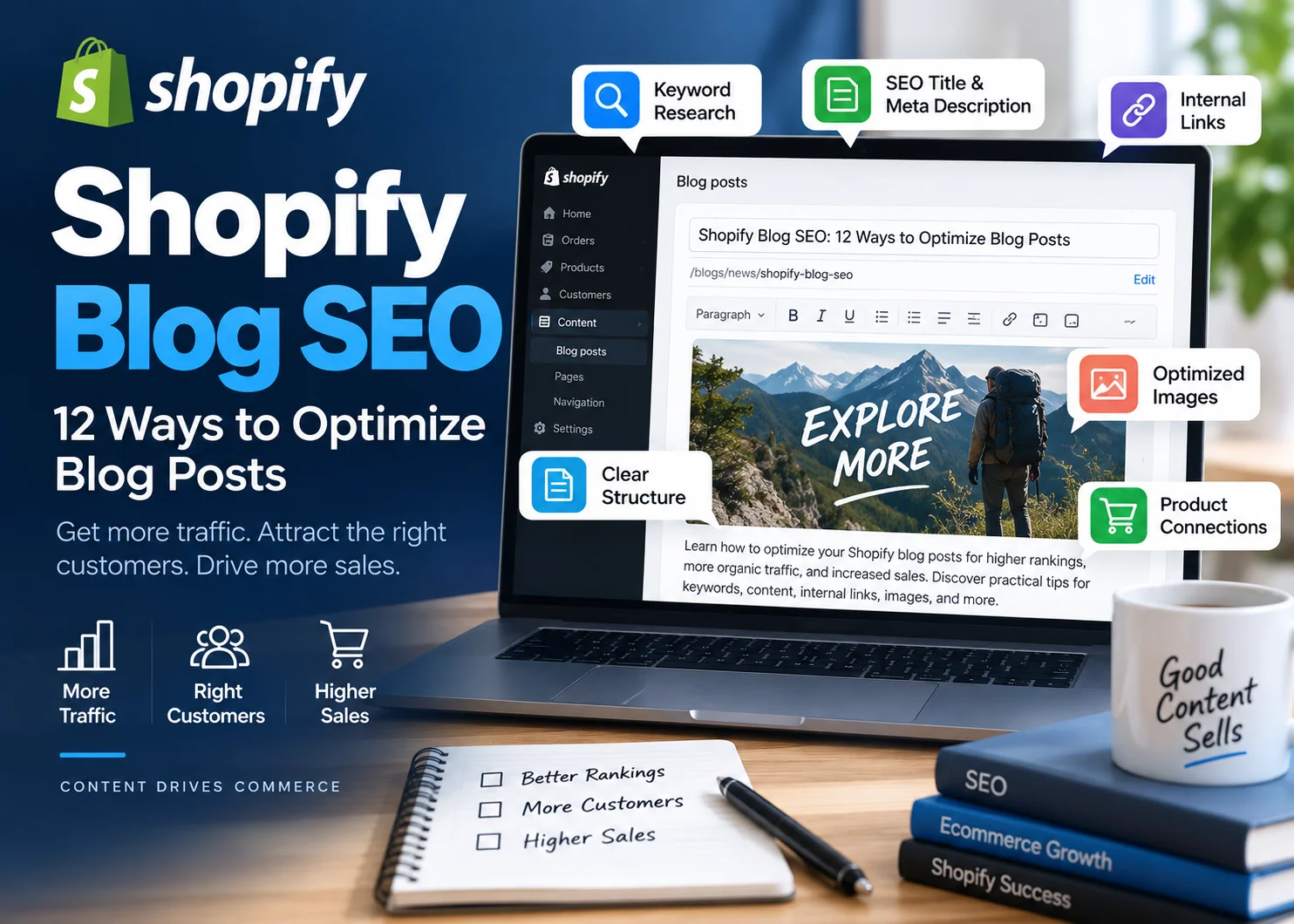
Shopify blog SEO is not simply publishing articles and waiting for Google traffic. A blog can attract potential customers, answer questions before they buy, strengthen your internal linking, and introduce shoppers to relevant products and collections—but only when the content is built around useful search intent and implemented correctly.
For Shopify stores, the best blog content usually sits between information and commerce. It answers a real customer question first, then gives that reader a logical next step toward a product, collection, buying guide, or other useful page.
This guide explains 12 practical ways to optimize Shopify blog posts for organic search, from choosing the right topics to formatting, internal linking, image optimization, content updates, and final publishing QA.
What Is Shopify Blog SEO?
Shopify blog SEO is the process of creating and optimizing blog posts so search engines can understand them and relevant customers can discover them through organic search.
It includes more than adding keywords. A well-optimized Shopify blog post typically combines:
- useful topic selection
- clear search intent
- strong on-page structure
- descriptive titles and metadata
- internal links
- optimized images
- relevant product or collection connections
- technical and publishing QA
Shopify’s own blog SEO guidance recommends choosing topics with keyword research, checking those topics against business goals, structuring articles clearly, using internal links, adding multimedia, monitoring technical issues, and updating older content.
That last point matters. Your blog should not operate separately from the rest of your ecommerce store. Strong blog SEO should support the customer journey and strengthen the relationship between informational content and commercial pages.
How to Optimize Shopify Blog Posts for SEO
1. Choose Topics That Support Your Products and Customers
The strongest Shopify blog topics usually come from the overlap between what people search for and what your business actually sells or understands well.
Imagine you run a store selling hiking footwear.
Relevant blog topics might include:
- how to choose hiking boots
- how should hiking boots fit?
- waterproof vs non-waterproof hiking boots
- hiking shoes vs hiking boots
- how to break in hiking boots
Those topics attract people who may eventually need the products you sell.
A high-volume topic that has nothing to do with your store might bring visitors but contribute little to product discovery, topical authority, or revenue.
Before choosing a keyword, ask:
- Would our target customer realistically search for this?
- Do we have useful expertise or information to add?
- Does the topic relate to a product category, customer problem, or buying decision?
- Can the article naturally connect to another useful page on the store?
If the answer to those questions is mostly no, search volume alone is not a strong reason to publish the article.
A documented planning process also helps prevent random topic selection. This guide on how to create an SEO content brief can help you map search intent, structure, supporting keywords, and content requirements before writing begins.
2. Target One Clear Primary Keyword
Each important blog post should have a clear primary search topic.
That does not mean repeating the exact keyword in every paragraph. It means building one page around one main intent.
For example:
Primary keyword: how to choose hiking boots
Supporting concepts might include:
- hiking boot fit
- boot height
- waterproof hiking boots
- hiking boot materials
- day hiking vs backpacking boots
These related concepts make sense because they help answer the main question.
Avoid creating several posts that all target virtually the same keyword with slightly different wording. For example:
- how to choose hiking boots
- how to pick hiking boots
- how to select hiking boots
Those may represent the same underlying intent and may be better handled by one comprehensive article.
Keyword mapping before publishing helps reduce this kind of overlap.
3. Match the Content Format to Search Intent
Choosing a relevant keyword is only the first step. You also need to understand what type of answer searchers expect.
A search query might call for:
- a how-to guide
- a comparison
- a checklist
- a buying guide
- a troubleshooting article
- a definition
- a tutorial
Before drafting, inspect the current search results.
If most ranking pages for a query are detailed tutorials, publishing a short product-focused article may not satisfy the same intent.
If the query is highly commercial, a product or collection page may be a better target than a blog article in the first place.
This is why search intent should be decided before writing, not after the article has already been drafted.
4. Write a Strong SEO Title and Article Title
Your title needs to explain the topic quickly.
Where it reads naturally, place the primary keyword near the beginning.
For example:
Weak: Great Ways to Get More Traffic From Your Shopify Articles
Better: Shopify Blog SEO: 12 Ways to Optimize Blog Posts
The second version tells the reader exactly what the article covers.
Google’s title link guidance recommends descriptive, concise page titles and warns against vague or unnecessarily long title text.
Your SEO title and article headline can be slightly different when there is a good reason, but they should describe the same page accurately.
Avoid forcing extra keyword variants into the title solely for SEO.
5. Keep the Shopify Blog URL Clear
Shopify blog posts normally use a URL structure that includes the blog path and an editable article handle.
For example:
/blogs/news/shopify-blog-seo
The editable part should be short and descriptive.
Avoid handles such as:
/blogs/news/12-best-amazing-shopify-blog-seo-tips-you-need-to-know-2026
Dates are especially worth considering carefully. If an article is intended to stay evergreen, placing a year in the URL can make future updates awkward.
If an existing post already has backlinks, rankings, or traffic, do not change its URL just to make the slug marginally prettier. URL changes should have a clear reason and should be handled with proper redirects.
6. Structure Blog Posts With Clear H2 and H3 Headings
Good formatting helps both readers and search engines understand the article.
Use H2 headings for major sections and H3 headings for related subsections.
For example:
H2: How to Choose Hiking Boots
H3: Choose the Right Boot Height
H3: Check the Fit
H3: Decide Whether You Need Waterproofing
Headings should describe the section beneath them. Do not create awkward headings simply to include another keyword variation.
Also use:
- short paragraphs
- bulleted lists where useful
- clear examples
- logical section ordering
- bold text selectively
A wall of text may contain excellent information but still be difficult for a customer to use.
Formatting is especially important on mobile, where long paragraphs and unclear sections become harder to scan.
7. Optimize the Meta Description
The meta description should give searchers a useful summary of the page and a reason to consider clicking.
For this article, an appropriate example would be:
Improve Shopify blog SEO with practical tips for keywords, content, internal links, images, metadata, product links, and publishing QA.
Include the main topic naturally, but do not treat the meta description as a container for every secondary keyword.
Important posts should also avoid sharing identical descriptions.
Remember that Google may generate a different search snippet when it believes another section of the page better matches the query. Your meta description is useful guidance, not a guaranteed search result.
8. Add Strategic Internal Links
Internal linking is especially important for ecommerce blogs because it connects informational content with the rest of the customer journey.
A Shopify blog post can link to:
- related articles
- relevant collections
- appropriate products
- buying guides
- helpful evergreen resources
For example, an article about choosing hiking boots could naturally link to:
- a hiking boots collection
- a waterproof hiking boots collection
- a hiking boot sizing guide
- a related hiking socks guide
Use descriptive anchor text rather than generic phrases such as “click here.”
There is another internal-linking step that ecommerce sites often miss: after publishing a new article, identify older relevant posts and add links to the new article.
This makes the new page less isolated and strengthens the relationships between related content.
Shopify’s current SEO checklist describes internal linking as an important tactic for helping search engines categorize related content and helping users discover deeper information. For a more detailed workflow, see these internal linking best practices.
Need help implementing links, formatting, metadata, and other SEO elements across a Shopify content library? Get help with Shopify content publishing.
9. Connect Informational Posts to Products and Collections
Traffic is valuable, but qualified traffic should have somewhere useful to go next.
This is where ecommerce blog SEO differs from generic publishing.
Suppose someone searches:
how to choose trail running shoes
Your article might explain:
- terrain
- grip
- cushioning
- heel-to-toe drop
- fit
- waterproofing
Once those concepts are explained, a contextual link to a trail running shoe collection can be genuinely useful.
The important word is contextual.
Do not insert product links simply because the article has traffic. Connect the reader to a product or collection when that page logically helps with the next step.
Broad buying guides may link more naturally to collections, while highly specific tutorials might link to individual products.
This approach creates a cleaner path:
Search query → useful article → relevant collection or product → purchase consideration
That is more valuable than treating the blog as a separate traffic channel with no connection to the store.
10. Optimize Blog Images
Images can make tutorials, comparisons, and buying guides easier to understand, but poorly optimized media can also make posts unnecessarily heavy.
Before uploading an image:
- resize it to appropriate dimensions
- compress unnecessary file size
- use an efficient format such as WebP when appropriate
- give the file a descriptive filename
- write appropriate alt text
- check how it displays on mobile
For example:
shopify-blog-seo-checklist.webp
is more descriptive than:
IMG_8294.webp
Google’s official image SEO documentation recommends useful, contextual alt text and short descriptive filenames rather than generic file names or keyword stuffing.
Alt text should describe the actual image. Do not insert a target keyword into every image description when it does not belong there.
For a more detailed workflow, see this guide to image SEO.
11. Refresh Older Shopify Blog Posts
Publishing new articles is only part of content SEO.
Older posts may become less useful because:
- screenshots are outdated
- products or collections have changed
- statistics are old
- links no longer work
- competitors now cover the topic more thoroughly
- search intent has changed
- the article lacks links to newer content
Periodically review important posts in Google Search Console.
Look for declining impressions, lost clicks, outdated information, or opportunities to improve internal links.
An update might include:
- rewriting weak sections
- adding missing subtopics
- replacing old screenshots
- adding newer internal links
- improving image optimization
- checking titles and descriptions
- fixing broken links
Avoid changing the URL of a successful post simply because you update its content.
For a step-by-step workflow, see how to update old blog posts for SEO.
12. Complete a Final Shopify Blog SEO QA Check
Publishing QA is one of the most overlooked parts of Shopify blog SEO.
A strong draft can still go live with incorrect headings, missing links, poor image formatting, or incomplete metadata.
Before publishing, check:
- primary keyword and search intent
- article title
- SEO title
- URL handle
- meta description
- H2 and H3 hierarchy
- paragraph formatting
- internal links
- product or collection links
- external sources
- image filenames
- alt text
- mobile presentation
- broken links
- indexability
Then review the actual live article.
Do not stop at the Shopify editor preview. Open the published page on desktop and mobile and verify that links, headings, images, spacing, and calls to action appear correctly.
Shopify’s 2026 SEO checklist notes that the platform handles several SEO defaults, including XML sitemaps and canonical tags, but store content, themes, apps, internal linking, and publishing decisions still require active management.
If your team writes the content but needs support implementing metadata, images, links, formatting, and final checks, discuss your Shopify content implementation workflow.
How Shopify Blog Content Supports Ecommerce SEO
A Shopify blog can support more than blog traffic.
Useful content can attract people earlier in the buying journey and help them understand products before they are ready to shop.
For example:
A customer searching how to choose a standing desk may not be ready to search for a particular product yet.
A useful article can explain:
- desk height
- desk dimensions
- motor types
- weight capacity
- workspace size
- ergonomic considerations
From there, the reader can move naturally to a standing desk collection.
Blog content can therefore support ecommerce SEO by:
- targeting informational searches that product pages cannot satisfy well
- building topical depth around product categories
- creating internal-link opportunities
- earning external links where content is genuinely useful
- helping customers make buying decisions
- introducing relevant products and collections
However, simply publishing more blog posts does not automatically improve product rankings.
The value comes from relevance, quality, internal linking, site structure, useful information, and how effectively the content connects with the rest of the store.
Shopify Blog SEO Example
Consider an outdoor footwear store that wants to rank for:
how to choose hiking boots
A strong article might include:
Understand the Types of Hiking Boots
Explain light hiking shoes, day-hiking boots, and heavier backpacking footwear.
Choose the Right Fit
Explain toe room, heel movement, sock thickness, and trying footwear under realistic conditions.
Consider Your Terrain
Discuss smoother maintained trails versus rocky or technical terrain.
Decide Whether You Need Waterproofing
Explain common use cases and trade-offs rather than simply recommending one option for everyone.
Choose the Right Materials
Explain common upper and sole materials where useful.
The post could then link contextually to:
- the hiking boots collection
- waterproof hiking boots
- hiking socks
- a sizing guide
- another article about breaking in hiking boots
This is a much stronger ecommerce content strategy than publishing a general outdoor article that attracts traffic but has no meaningful relationship to the products the store sells.
Shopify Blog SEO Checklist
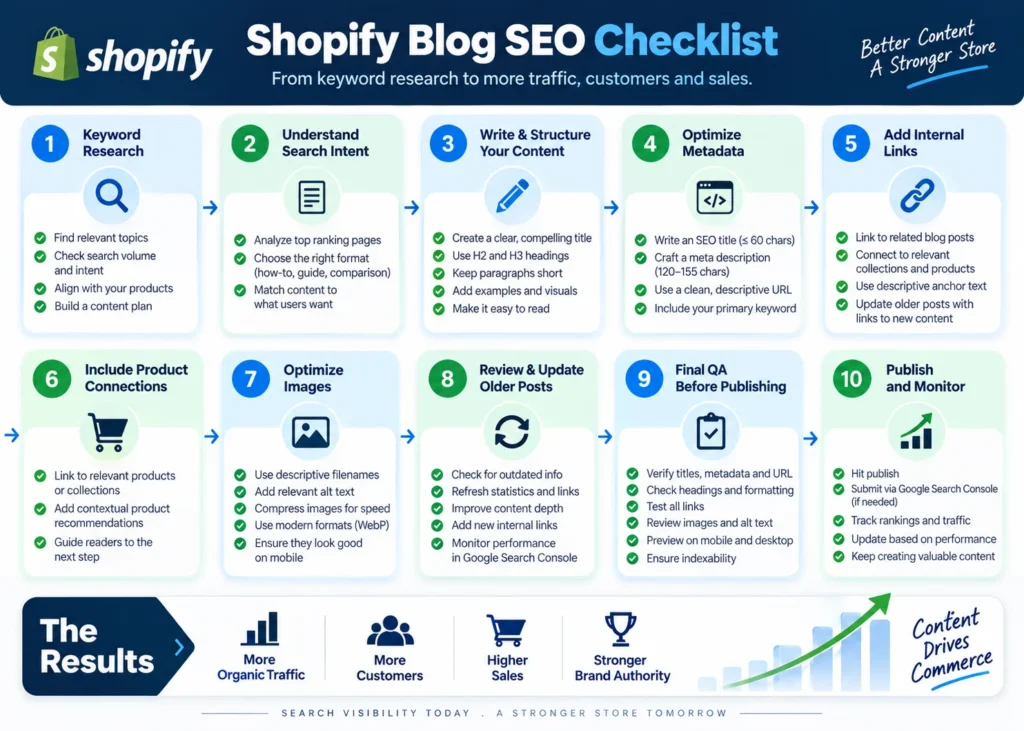
Before publishing a Shopify blog post, confirm that you have:
- chosen a business-relevant primary keyword
- checked the search intent
- reviewed competing search results
- written a clear article title
- created a concise URL handle
- organized the content with H2 and H3 headings
- written a useful meta description
- added relevant internal links
- linked suitable products or collections where helpful
- included authoritative external sources where appropriate
- optimized images and alt text
- checked the post on mobile
- reviewed the live article after publishing
For Shopify stores publishing content at scale, the challenge is often not knowing what good SEO looks like. It is implementing those requirements consistently across every article.
Contact NextWebOps for Shopify publishing and SEO implementation support.
Does Blogging Help Shopify SEO?
Blogging can support Shopify SEO when the content serves topics relevant to your customers and products.
A blog gives an ecommerce store the ability to target questions and informational searches that would not fit naturally on product or collection pages.
For example, a cookware store may struggle to target:
how to season a cast iron skillet
with a product page.
A blog post is a much better format for that question. The article can solve the immediate problem while linking naturally to cast iron cookware, care accessories, or related guides.
Blogging becomes less useful when stores publish generic content simply to increase article count.
Posting three times per week is not automatically better than publishing one genuinely useful article that matches an important customer question.
Quality, relevance, usefulness, and strategic connections to the rest of the site matter more than arbitrary publishing frequency.
Common Shopify Blog SEO Mistakes
Many Shopify stores publish useful content but lose SEO value through avoidable implementation problems.
Common mistakes include:
- Choosing topics based only on volume: Traffic that has no relationship to the store may have limited commercial value.
- Ignoring search intent: A well-written article can still struggle if it uses the wrong format for the query.
- Targeting the same topic repeatedly: Several similar posts can create unnecessary overlap.
- Using vague titles: Readers and search engines should understand the topic immediately.
- Forgetting internal links: New articles should connect to relevant existing pages.
- Ignoring older posts: Outdated content can lose usefulness over time.
- Uploading oversized images: Heavy media can make otherwise useful articles unnecessarily slow.
- Forgetting products and collections: Ecommerce blog traffic should have useful next steps.
- Publishing without QA: Broken links, incorrect headings, and missing metadata can undermine a strong draft.
- Writing for an SEO score instead of the reader: Plugin scores can help identify missing basics, but they should not dictate awkward keyword repetition or unnecessary content.
Final Thoughts on Shopify Blog SEO
The best Shopify blog SEO strategy does not begin with publishing volume. It begins with useful topics that match customer searches and connect naturally to the products and expertise behind the store.
From there, execution matters.
Every important article should have a clear keyword and intent, logical headings, useful metadata, strategic internal links, optimized images, relevant product or collection paths, and a final live-page QA check.
That creates a content system rather than a collection of disconnected blog posts.
For ecommerce businesses and agencies managing ongoing content production, consistent implementation can become a substantial workload. NextWebOps supports Shopify content publishing, formatting, metadata, internal linking, image optimization, on-page SEO implementation, and publishing QA.
Contact NextWebOps about your Shopify content publishing needs.
Frequently Asked Questions
Does blogging help Shopify SEO?
Blogging can support Shopify SEO when posts answer relevant customer searches, provide genuinely useful information, connect to related site content, and support important products or collections. Publishing articles simply to increase content volume is unlikely to be as valuable as building focused topical coverage.
Is Shopify good for blogging?
Shopify includes built-in blogging functionality that is sufficient for many ecommerce stores. It allows merchants to publish articles within the same domain as their store, add content and images, manage article handles, and connect blog posts to other store pages. The more important question is whether the blog content itself is useful and implemented correctly.
How often should I publish Shopify blog posts?
There is no universal publishing frequency required for SEO. Choose a schedule your team can maintain without sacrificing research, usefulness, optimization, or quality. One strong article every two weeks can be more valuable than several weak posts published only to meet a quota.
How do I optimize a Shopify blog post for SEO?
Start with a relevant keyword and search intent, use a clear title and URL, organize the article with logical headings, write useful content, add internal and authoritative external links, optimize images and metadata, connect the article to appropriate products or collections, and review the live page after publishing.
Should Shopify blog posts link to products?
Yes, when the product is genuinely relevant to what the reader is trying to accomplish. Product links should feel like a useful next step rather than an unrelated sales insertion.
Should Shopify blog posts link to collection pages?
Collection links are often useful when the article discusses a broader product category and readers may want to compare multiple options. For example, an article about choosing running shoes may naturally link to a running shoe collection rather than one individual product.
How long should a Shopify blog post be?
There is no ideal word count that applies to every query. The article should be long enough to answer the searcher’s question thoroughly without adding filler. Some focused questions may need only a concise answer, while complex comparisons and buying guides may require substantially more detail.
Can I update old Shopify blog posts for SEO?
Yes. Updating older content can improve usefulness when information, screenshots, internal links, products, or search expectations have changed. Preserve established URLs when possible and focus on meaningful improvements rather than changing publication dates without substantially updating the content.
Leave a Reply