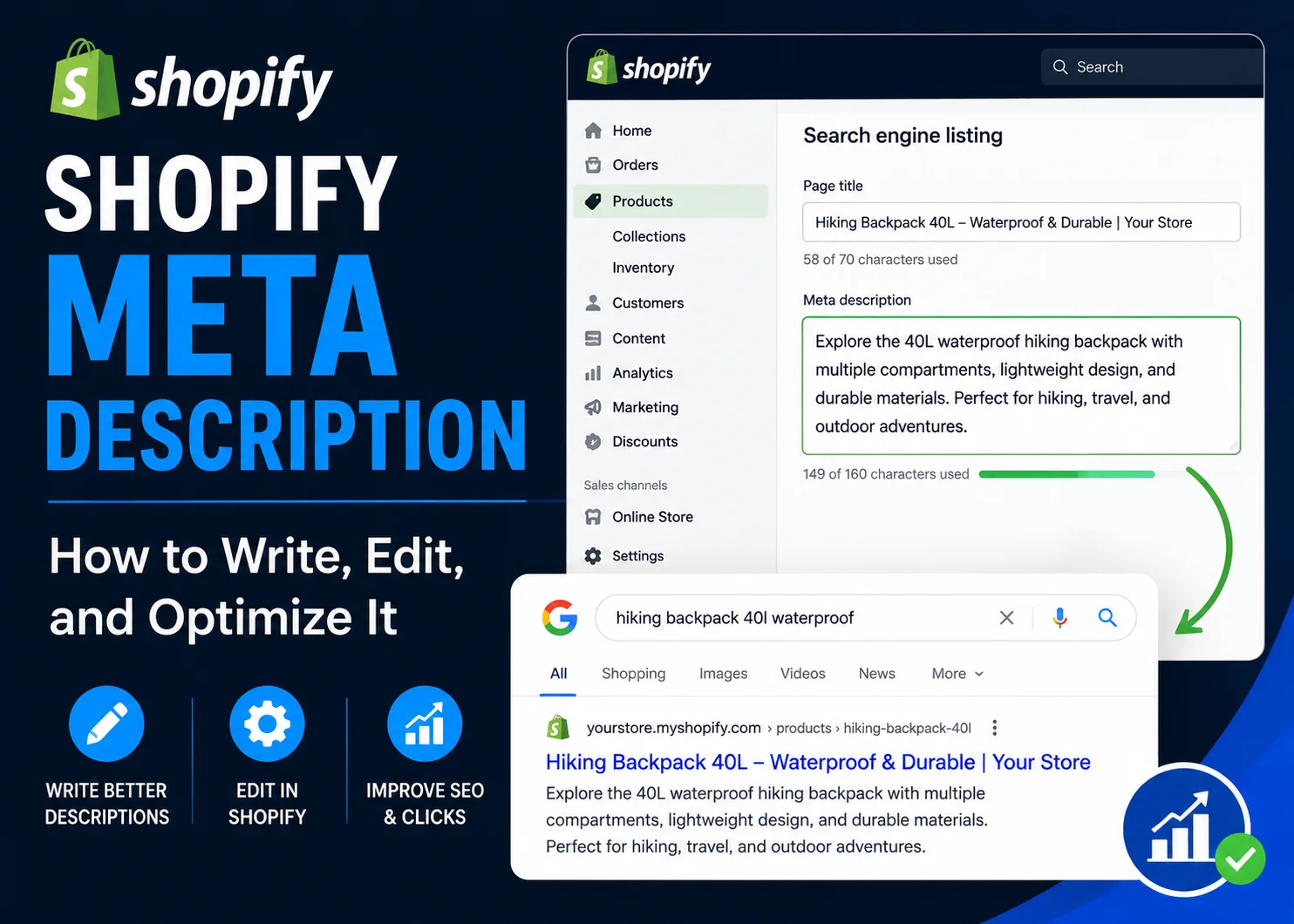
A Shopify meta description is a short summary associated with a page in your Shopify store that may appear below the page title in search results. It helps searchers understand what the page offers before they click.
For Shopify stores, meta descriptions can be used for product pages, collections, regular pages, blog posts, and the homepage. A good description should accurately summarize the page, reflect the searcher’s intent, and communicate a useful reason to visit.
It is also important to understand what a meta description is not. It is not the same as the product description customers read on your storefront, and writing one does not guarantee that Google will display it exactly as entered.
This guide explains where to edit Shopify meta descriptions, how long they should be, how to write them, and how to create useful descriptions for different types of ecommerce pages.
What Is a Shopify Meta Description?
A Shopify meta description is a piece of page metadata that summarizes the content or purpose of a Shopify URL.
Search engines may use it as the descriptive text shown underneath your page title in search results.
For example, a collection page for waterproof hiking boots might use a description such as:
Explore men’s waterproof hiking boots for wet trails and outdoor adventures. Compare styles, features, and sizes to find the right pair.
This gives a potential visitor useful context before they open the page.
A Shopify meta description should generally tell searchers:
- What the page contains
- Who or what it is relevant to
- What value the visitor can expect
- What action may make sense next
Meta descriptions are one part of broader Shopify on-page SEO. Titles, page copy, headings, URLs, images, internal links, and publishing quality also contribute to how well a page is optimized.
Shopify Meta Description vs Product Description
One common source of confusion is the difference between a Shopify product description and a meta description.
They serve different purposes.
| Element | Product Description | Meta Description |
|---|---|---|
| Visible on product page | Yes | Usually no |
| Main purpose | Explain and help sell the product | Summarize the page for search results |
| Typical length | Depends on the product | Usually concise |
| Content | Features, benefits, sizing, materials, use cases | Main topic, value, and search relevance |
| Primary audience | Visitors already on the product page | Potential visitors reviewing search results |
Your product description may contain several paragraphs explaining specifications, materials, benefits, sizing, or use cases.
Your meta description should condense the most relevant information into a much shorter summary.
You can reuse the same underlying messaging, but copying a long product-description sentence into the metadata field is not always the best approach.
Does a Shopify Meta Description Affect SEO?
A meta description should not be viewed as a direct shortcut to higher rankings.
Its main value is communicating what a searcher can expect from the page.
A clear description can help:
- Make the relevance of the page obvious
- Differentiate one result from another
- Communicate an important product or category benefit
- Encourage qualified searchers to consider the page
That makes metadata worth optimizing even though it is only one part of the complete SEO picture.
A strong meta description will not fix thin product content, weak search intent alignment, poor internal linking, or other page-level problems.
Use metadata as part of a broader web page optimization process rather than treating it as an isolated ranking tactic.
How Long Should a Shopify Meta Description Be?
Shopify’s SEO guidance recommends using approximately 160 characters for meta descriptions.
In practice, it is useful to aim for roughly 150–160 characters when the message fits naturally.
However, 160 characters should not be treated as an absolute rule.
Search-result snippets can vary, and Google may shorten or replace the text depending on the search query.
A better approach is to:
- Put the most important information early
- Keep the description concise
- Avoid unnecessary filler
- Write a complete thought
- Prioritize clarity over hitting an exact character count
For example, this is more useful:
Explore insulated stainless steel water bottles for commuting, hiking, and everyday use. Compare sizes, colors, and styles.
than:
Shop our amazing selection of high-quality products and discover the very best products we offer online today.
The first description tells the searcher what the page actually contains.
How to Edit a Meta Description in Shopify
Shopify provides SEO fields for several types of store pages. The exact wording of interface labels can change over time, but the basic process is similar: open the relevant page in Shopify, find its search engine listing section, and edit the SEO description.
Shopify’s official SEO documentation is the best reference when you need the latest interface instructions: Shopify Help Center SEO guidance.
How to Edit the Shopify Homepage Meta Description
For the homepage, the SEO settings are generally managed through your online store preferences.
The workflow is typically:
- Open your Shopify admin.
- Go to Online Store.
- Open Preferences.
- Find the homepage SEO or search-engine-related fields.
- Update the homepage title and meta description.
- Save your changes.
Your homepage description should summarize the overall store rather than focus on one individual product.
How to Edit a Product Meta Description
For a product page:
- Open Products in Shopify.
- Select the product you want to optimize.
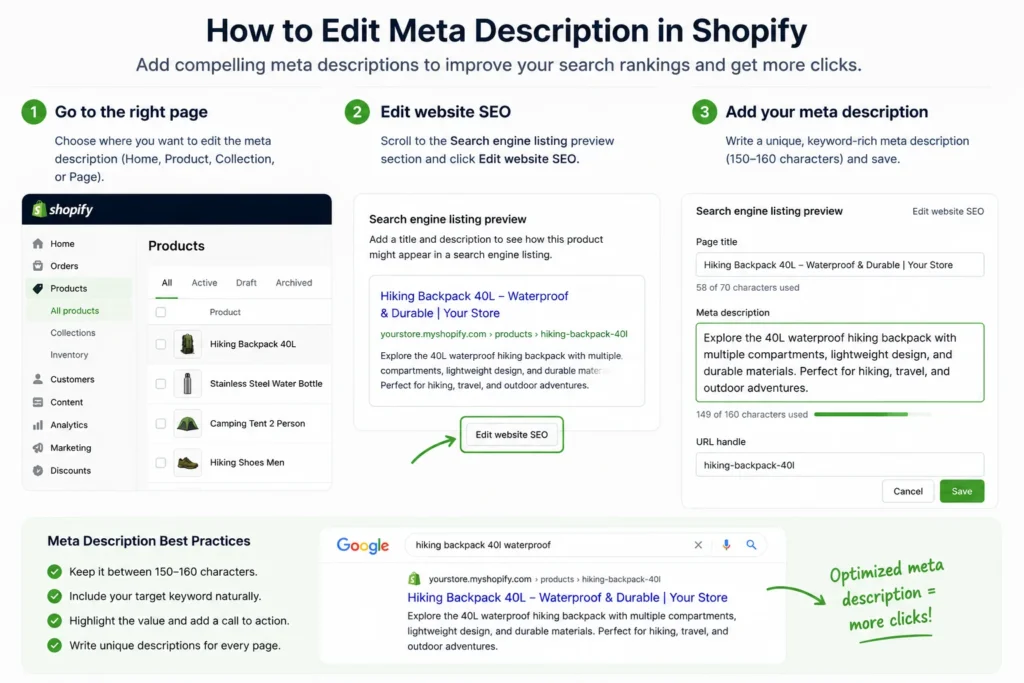
- Scroll to the Search engine listing area.
- Choose the option to edit the website SEO or search listing.
- Update the meta description.
- Save the product.
The description should reflect the specific product and its strongest relevant benefits rather than using the same generic description across the entire catalog.
How to Edit a Collection Meta Description
For a collection:
- Open your Shopify collections.
- Select the collection.
- Find the search engine listing section.
- Edit the website SEO information.
- Add or revise the meta description.
- Save the collection.
Collection metadata should communicate the broader category and help searchers understand the types of products they will find.
How to Edit a Regular Page Meta Description
For informational pages such as About, sizing, care, or other custom pages:
- Open your Shopify pages.
- Select the page you want to edit.
- Find its search engine listing preview.
- Edit the SEO description.
- Save the page.
How to Edit a Shopify Blog Post Meta Description
Blog articles can also have search listing information.
Open the relevant blog post, locate its search engine listing settings, and write a description that summarizes the question or topic the article answers.
An informational article normally needs a different type of call to action than a product or collection page.
How to Write a Good Shopify Meta Description
There is no single sentence formula that works for every store. However, the following principles make descriptions more useful and easier to scale.
1. Match the Search Intent
Start by considering why someone would search for the page.
A product-page description should help someone evaluating a particular product.
A collection description should help someone browsing a category.
A blog meta description should tell readers what they will learn.
For example:
Product intent: Highlight the specific product and useful differentiator.
Collection intent: Explain the product category and available options.
Informational intent: Explain what question the guide answers.
2. Include the Main Topic Naturally
The main keyword or topic can help make the result immediately relevant to searchers.
Use it naturally rather than forcing several variations into one short description.
For example:
Natural: Explore men’s waterproof hiking boots designed for wet trails and everyday outdoor use.
Stuffed: Shop waterproof hiking boots, best hiking boots, waterproof boots, men’s hiking boots and hiking shoes.
The first is clearer and more useful.
3. Highlight a Real Value or Differentiator
Once the topic is clear, tell the searcher why the page may be worth visiting.
Depending on the page, this could include:
- Materials
- Product use
- Available sizes or styles
- Category variety
- A useful informational outcome
- An accurate service or shipping benefit
Only include claims that are actually supported by the store.
4. Make Important Descriptions Specific
Large stores often rely heavily on templates because manually writing hundreds or thousands of descriptions takes time.
Templates can be useful, but priority pages should still be specific.
For example, using this on every product:
Shop quality products at great prices. Order online today.
does little to distinguish one product from another.
A more specific product description gives both searchers and internal teams clearer context.
5. Put Important Information Early
Do not hide the main message at the end of a long sentence.
Search snippets may be shortened, and people scanning results make decisions quickly.
Lead with the page topic or strongest relevant value.
6. Use a Natural Call to Action When Appropriate
A small call to action can help make the description more actionable.
Examples include:
- Explore the collection
- Compare styles and sizes
- View product details
- Learn how to choose
- Browse available options
Match the action to the page.
“Shop now” may make sense for a product collection but can sound awkward on an educational article.
For a broader review of page-level elements beyond metadata, use the NextWebOps on-page SEO checklist.
Shopify Meta Description Examples
The best meta description depends on the page type. The following examples show how messaging can change between products, collections, the homepage, and blog content.
Shopify Product Meta Description Example
Imagine a store selling a 40-liter waterproof hiking backpack.
Example:
Explore a 40L waterproof hiking backpack with organized storage and a lightweight design for day hikes, travel, and outdoor adventures.
This description identifies:
- The product
- Its capacity
- A useful feature
- Common use cases
Shopify Collection Meta Description Example
For a men’s waterproof hiking boot collection:
Example:
Explore men’s waterproof hiking boots for wet trails and outdoor adventures. Compare styles, features, and sizes to find the right pair.
This works differently from a product description because the visitor is choosing between multiple options.
Shopify Homepage Meta Description Example
For an outdoor equipment store:
Example:
Shop practical outdoor gear for hiking, camping, and travel. Explore durable backpacks, footwear, accessories, and everyday adventure essentials.
The homepage description provides broader brand and inventory context.
Shopify Blog Meta Description Example
For an article about choosing hiking footwear:
Example:
Learn how to choose waterproof hiking boots based on fit, materials, traction, and trail conditions with this practical beginner-friendly guide.
The goal here is not an immediate sale. It is to make the informational value clear.
Shopify Meta Description Templates
Templates can speed up metadata creation, especially for larger catalogs. They should be treated as starting points rather than text to copy unchanged across every page.
Product Meta Description Template
Template:
Shop [product name/type] with [primary benefit]. [Secondary feature or differentiator]. Explore details, options, and availability from [brand].
Example:
Shop insulated stainless steel water bottles that keep drinks at the right temperature longer. Explore available sizes, colors, and styles.
Collection Meta Description Template
Template:
Explore [product category] for [audience/use case]. Compare [important features/options] and find the right [product type] for your needs.
Homepage Meta Description Template
Template:
Discover [brand/store category] offering [main product/value]. Shop [key categories] designed for [audience or use case].
Blog Meta Description Template
Template:
Learn [topic or outcome] with practical guidance on [important subtopics]. Use this guide to [reader benefit or action].
Templates work best when variable information makes every result genuinely specific.
Changing only the product name while leaving the rest of the sentence generic can still produce hundreds of descriptions that sound almost identical.
Common Shopify Meta Description Mistakes
Meta descriptions are simple fields, but several common mistakes can reduce their usefulness.
Leaving Important Pages Blank
Not every URL needs manually crafted metadata, but important products, collections, and landing pages usually deserve a deliberate description.
Duplicating the Same Description Across the Store
If hundreds of pages use exactly the same description, the metadata provides little page-specific information.
Prioritize unique descriptions for commercially important pages first.
Copying the Full Product Description
The product description and meta description serve different purposes.
Summarize the strongest relevant information rather than trying to squeeze body copy into the SEO field.
Keyword Stuffing
A short description filled with repeated keyword variations becomes difficult to read and can look untrustworthy.
Making Unsupported Claims
Do not add phrases such as “best,” “lowest price,” “free shipping,” or “number one” unless the statement is accurate and defensible.
Writing Vague Descriptions
Descriptions such as “Welcome to our store. Browse our amazing products today” do not explain why the specific page is relevant.
Using Only a Brand Slogan
A slogan may strengthen branding, but it often does not provide enough information about the page itself.
Ignoring Search Intent
A collection, product, homepage, and blog article should not all use the same style of description.
Treating 160 Characters as a Hard Rule
Character guidance is helpful, but clarity matters more than forcing a description to reach or avoid one exact number.
Skipping Publishing QA
After entering metadata, confirm it is saved to the correct Shopify page and that the title, description, URL, and body content all align.
What If Google Shows a Different Meta Description?
You may write a carefully optimized Shopify meta description and later notice that Google displays different text in its search results.
That does not automatically mean something is wrong with your Shopify setup.
Search engines can generate a snippet from other text on the page when they determine that another passage better matches a particular search query.
For example, your collection meta description might summarize the category broadly, while a searcher uses a very specific phrase that appears within the collection content. Google may decide that the on-page text is a more relevant snippet for that search.
The best response is usually to keep your metadata:
- Accurate
- Relevant
- Consistent with the page content
- Specific to the page
Do not repeatedly rewrite a good description simply because a search engine displays another snippet for some queries.
Do You Need a Shopify Meta Description Generator?
Meta description generators can be useful when a store contains a large catalog.
They can help with:
- Generating first drafts
- Creating variations
- Developing templates
- Speeding up repetitive metadata work
However, generated metadata should still be reviewed.
Check for:
- Incorrect product claims
- Repeated wording
- Missing differentiators
- Awkward language
- Keyword stuffing
- Descriptions that do not match the actual page
A generator can produce text quickly. It cannot guarantee that every description accurately represents the product, collection, brand, or current offer.
How to Manage Meta Descriptions Across a Large Shopify Store
Writing individual descriptions becomes a different operational challenge when a store contains hundreds or thousands of products.
Instead of treating every URL as equally important, prioritize metadata based on business value and search opportunity.
You might start with:
- Best-selling products
- High-value collections
- Pages receiving significant search impressions
- Products ranking near page one
- Major evergreen landing pages
- Pages with missing or clearly duplicated metadata
For lower-priority pages, carefully designed templates or automated drafts can reduce repetitive work.
For high-value pages, manual review is usually worth the additional effort.
This approach follows the same principle as a broader content optimization strategy: prioritize pages with meaningful opportunity instead of trying to improve everything at once.
Updating descriptions across dozens or hundreds of Shopify products and collections can become repetitive quickly. Contact NextWebOps for Shopify metadata implementation and publishing support.
Shopify Meta Description Checklist
Before finalizing an important Shopify meta description, check the following:
- Does it accurately describe the page?
- Does it match the page’s search intent?
- Is the primary topic included naturally?
- Is the most useful information near the beginning?
- Is it concise enough for a search-result summary?
- Is it roughly 150–160 characters when practical?
- Is it distinct from other priority pages?
- Does it avoid keyword stuffing?
- Are all claims accurate?
- Does the CTA fit the page type?
- Was it entered into the correct Shopify SEO field?
- Was the page saved and QA-checked?
Have a spreadsheet or SEO brief with titles and meta descriptions ready to publish? Talk to NextWebOps about implementing and QA-checking Shopify metadata at scale.
Final Thoughts
A good Shopify meta description gives searchers a concise and accurate reason to consider your page.
The strongest descriptions:
- Match search intent
- Describe the page accurately
- Use the main topic naturally
- Communicate real value
- Stay concise
- Remain specific to important products and collections
But metadata should not be optimized in isolation.
A strong description works best when the Shopify page also has useful content, clear titles and headings, optimized images, sensible internal links, and accurate publishing implementation.
For the complete page-level workflow, see the NextWebOps guide to Shopify on-page SEO.
Need help updating Shopify titles, meta descriptions, product content, images, or other on-page elements? Get in touch with NextWebOps for hands-on Shopify content implementation and publishing support.
Frequently Asked Questions
What is a Shopify meta description?
A Shopify meta description is a short piece of metadata that summarizes a product, collection, page, blog post, or homepage. Search engines may display it underneath the page title in search results.
How do I edit a meta description in Shopify?
Open the relevant Shopify product, collection, page, or blog post and find its search engine listing section. Use the website SEO editing option to add or change the meta description, then save the page. Homepage metadata is generally managed through Online Store preferences.
How long should a Shopify meta description be?
A useful target is roughly 150–160 characters, with Shopify recommending around 160 characters. Treat this as practical guidance rather than a rigid limit, because search-result snippets can vary.
Does a meta description affect Shopify SEO?
A meta description is useful for communicating page relevance and encouraging qualified searchers to consider a result, but it should not be treated as a standalone ranking tactic. It works alongside content, titles, headings, links, images, and other SEO elements.
What is the difference between a Shopify product description and meta description?
A product description appears on the storefront and helps customers understand and evaluate the product. A meta description is a shorter page summary stored as metadata and may appear in search results.
Does Shopify automatically generate meta descriptions?
Shopify provides SEO fields and search engine listing functionality, but important pages benefit from manually reviewed metadata that accurately reflects the specific product, collection, or content.
Why is Google showing a different meta description?
Google can generate a search snippet from text on the page when it believes that content better matches a particular query. Seeing different snippet text does not necessarily mean the Shopify meta description is configured incorrectly.
Should every Shopify product have a unique meta description?
Unique, page-specific metadata is especially useful for important products and collections. For very large catalogs, prioritize high-value pages and use carefully reviewed templates or automation where manual writing for every URL is impractical.
Leave a Reply